


Your best project context is often already written down. It is sitting in meeting notes, research documents, saved links, and half-finished drafts. The problem is finding the right pieces when a decision is due.
Chatting with your notes in Brainfo helps you ask questions across the material relevant to that decision. This guide shows you how to chat with your notes using a simple workflow: select the right context, ask a focused question, verify the important parts of the answer, then turn the result into work.
Brainfo can help you work with notes, documents, and saved links relevant to the question at hand. The goal is not to ask a vague chatbot question. It is to give an AI enough relevant material to help you think through a real task. Learn about Brainfo AI.
What it means to chat with your notes
Chatting with your notes means asking an AI questions that use the notes, documents, and other selected material you have saved as context. The result can help you retrieve information, compare ideas, summarize research, or identify next actions.
That is different from starting a general AI chat with no context. A general chat can offer ideas. A source-aware chat can help you work with the decisions, research, and constraints already inside your project.
In Brainfo, that context can include notes, documents, and saved links. Its broader feature set also describes conversations across multiple documents, PDFs, web links, and videos. See Brainfo features.
Use the select, ask, verify, act workflow
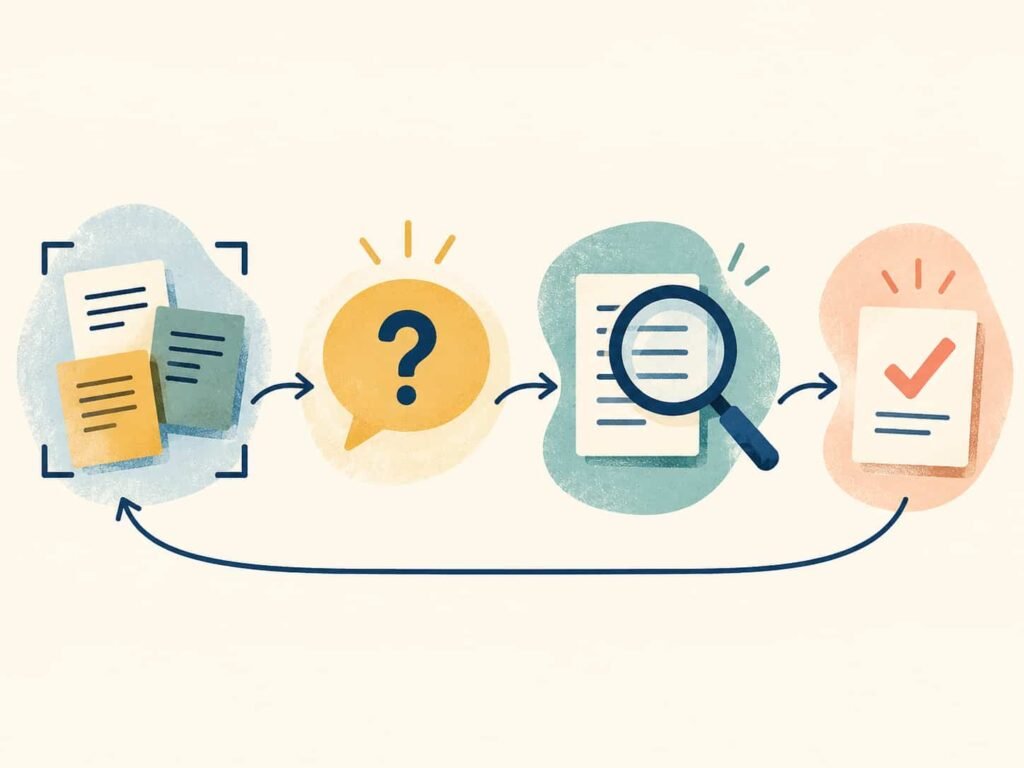
The quality of an AI answer starts before you write the prompt. Use this four-step workflow when you need to chat with your notes.
1. Select the material that belongs to the question
Start with one active project or decision. Include the notes that explain the background, the document that states the current plan, and any saved research that affects the choice.
For example, imagine you are planning a product launch. You might select customer interview notes, the launch brief, competitive research, and a saved article about a market change.
Do not add every note you have ever written. More context is not always better context. A focused source set makes it easier to spot what supports the answer and what does not.
2. Ask for a decision, synthesis, or next step
A weak prompt asks, “What do you think about this?”
A useful prompt says what you need, who the output is for, and how you want it structured. For example:
Based only on these notes, summarize the three biggest launch risks. For each risk, list the evidence, the missing information, and one recommended next action.
This gives the conversation a job. It also makes the output easier to review because you can compare each point with the selected source material.
3. Verify important answers against the original material
AI is helpful for surfacing patterns, but it should not become the final authority on a consequential decision.
If the answer includes a date, commitment, customer request, technical constraint, or conclusion that changes your next move, open the underlying note or source and check it. Treat the response as a fast research assistant, not as proof.
This habit matters most when your source set is large, incomplete, or contains conflicting information. A good answer can still miss context. A verified answer gives you something you can act on. For higher-stakes decisions, the NIST AI Risk Management Framework offers a useful reference for thinking about trustworthiness and risk in AI-enabled work.
4. Turn the useful answer into work
The point of chat with your notes is not to collect another summary. It is to move work forward.
Once an answer is useful, turn it into a document, a task list, a project update, or a more focused follow-up question. Brainfo’s current AI pages describe turning an AI chat into a document, while its task capabilities can capture action items with status, priority, and due dates. Explore Brainfo AI workflows.
Five prompts worth using with your notes
The best prompts create a useful constraint. These are a good starting point.
Find a decision and its rationale
What decision did we make about [topic]? Identify the notes that support it, and flag anything that still appears unresolved.
Use this after a series of meetings or asynchronous discussions.
Compare two sets of research
Compare the evidence in these customer interviews with the competitive research. Where do they agree, where do they conflict, and what should we investigate next?
Use it when you need synthesis, not another document summary.
Extract actions, owners, and open questions
List the action items mentioned in these notes. Separate confirmed owners and dates from items that need an owner or deadline.
This prompt helps turn meeting context into an operational checklist without pretending missing information is settled.
Turn scattered notes into a draft
Create a first outline for a [brief, proposal, or project update] using these notes. Keep every claim tied to the source material and list the facts that still need verification.
This is a better use of AI than asking for polished copy before the argument is clear.
Identify what is missing before a decision
Based on these notes, what information would a decision-maker still need before approving this plan? Group the gaps by risk, evidence, and ownership.
Use this when the real problem is not writing. It is uncertainty.
How to get better answers from Brainfo
Narrow the context before broadening the question
Start with the smallest source set that can answer the question. If the answer is incomplete, add the next most relevant note or document. This is easier to review than starting with a large, mixed collection of material.
State the output format and decision criteria
Tell the AI how to organize the result. Ask for a table, ranked options, action list, draft outline, or list of unanswered questions. If there is a decision criterion, name it.
For instance, instead of asking which launch plan is better, ask which plan best meets the stated deadline, budget, and customer requirements.
Keep the answer close to the source material
Ask the AI to distinguish between what the sources state, what it infers, and what remains unknown. That one instruction makes the conversation more useful for research, planning, and team handoffs.
Limits to keep in mind
Brainfo’s core notes, documents, bookmarks, and tags are local-first and can remain available offline. AI chat, web search, and file upload need an internet connection. Keep source sets focused because selected material is processed in manageable batches rather than as unlimited workspace context.
Finally, chat with your notes can surface a pattern and accelerate a first draft. When you chat with your notes for a consequential decision, it cannot confirm that a source is current, resolve a contradiction on its own, or take responsibility for the decision. Keep the source material visible when the stakes are high.
Start with one active project
Pick one project that has enough notes to be useful and enough uncertainty to matter. Gather the relevant material, ask one focused question, and verify the answer before turning it into a next step.
That is how a note collection becomes working knowledge.
If you are deciding whether Brainfo fits the rest of your knowledge workflow, compare Brainfo with other platforms.
Frequently asked questions
What does it mean to chat with your notes?
It means asking AI questions that use the notes, documents, and other selected material you have saved as context. The result can help you retrieve information, compare ideas, summarize research, or identify next actions.
Can Brainfo chat with documents as well as notes?
Brainfo’s official feature pages describe AI conversations across notes, documents, PDFs, saved links, web links, and videos. Choose the material relevant to your question rather than assuming every workspace item is included automatically.
What should I ask an AI about my notes?
Ask questions with a clear task and output format. Good examples include identifying a decision, comparing research, extracting action items, outlining a document, or listing missing information.
Should I trust every answer from an AI notes chat?
No. Verify facts, commitments, dates, and conclusions that matter by checking the original material. AI is useful for synthesis and discovery, but it does not replace source review.
Does Brainfo AI chat work offline?
No. Core Brainfo content can remain available offline, but AI chat, web search, and file upload require an internet connection.





