The announcement says a service has changed its pricing. An older PDF describes a different billing model. Your interview notes suggest existing customers may be treated differently. Asking AI to write the article now could turn that uncertainty into a confident opening paragraph.
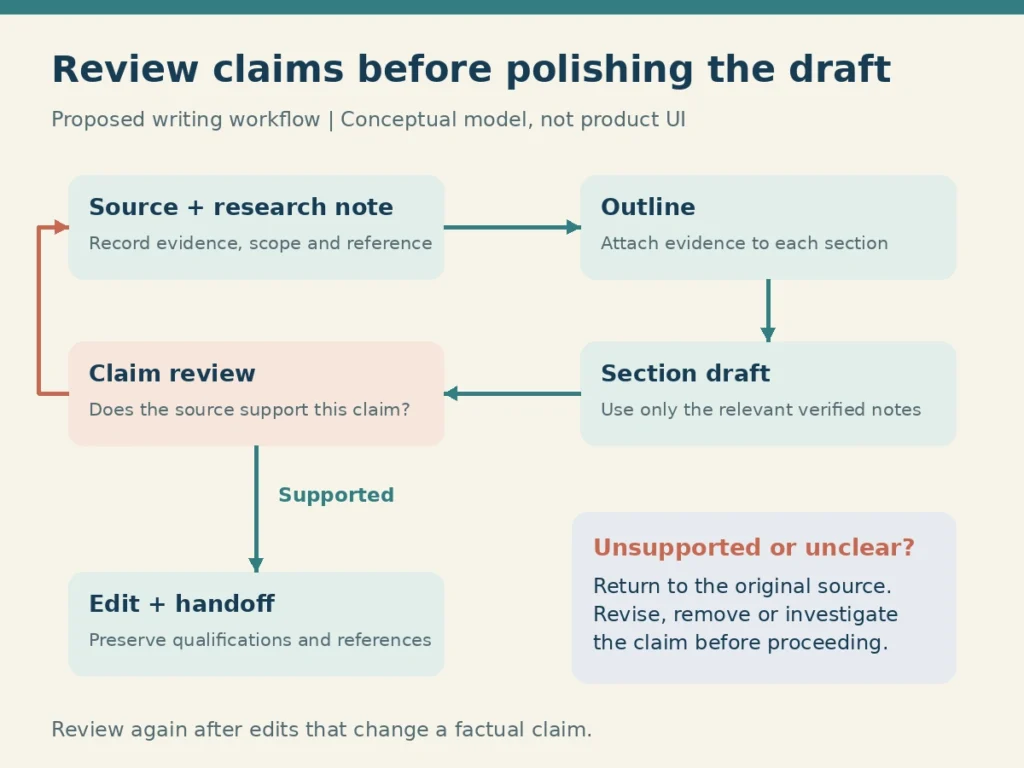
This guide to Brainfo for writers follows a practical research-to-draft workflow: keep the brief, sources, notes, and draft in one project space. Select relevant material, check what it supports, build an outline, and draft one section at a time. Review the claims before polishing the prose.
The example below is hypothetical: a writer preparing a business newsletter about a service’s pricing change. It illustrates a proposed workflow, not a hands-on product test or a real customer result.
How Brainfo for writers connects research to a draft
Brainfo brings notes, documents, bookmarks, and AI assistance into a workspace. Notes can hold findings and questions; bookmarks keep source URLs accessible; a document holds the developing article. The broader Brainfo workspace for writers explains those writing uses.
Its supervisor delegates work to specialists. Researcher works with selected uploaded files and web pages, Writer creates and manages documents, notes, and bookmarks, and Organizer handles folders and tags. See Brainfo’s AI agents for the product’s capability overview. AI chat, web research, and file upload require an internet connection.
The useful connection is practical: research can inform a note that informs a section of the draft. You still need to create and check the references that make that connection understandable. Do not assume an AI response establishes that every sentence is supported.
Start with a brief in one project space
Give one active piece a home. Keep its brief, research notes, source bookmarks, and working document within the same space. Brainfo’s AI works within the current space, so gathering the relevant project material there matters.
For the newsletter example, write a short brief: the reader is a small-business owner considering the service; the article should explain what changed and what to check before subscribing. Comparing every competing service is outside its scope.
Define what the piece must establish
Record the questions that would make the article useful:
- What changed, and when does the change apply?
- Which customers or plans are affected?
- What does the available evidence leave unresolved?
Add the delivery requirements, such as newsletter length and whether an editor needs a document or an exported file. Keep a separate list of claims awaiting confirmation. That list prevents a missing answer from quietly becoming part of the brief.
Collect sources and record what each one supports
Save the announcement and the service’s current subscription help page as bookmarks. When online, select the PDF as an uploaded research file and include the relevant interview note as context. Check that the material can actually be read before depending on it. A saved URL alone does not preserve every detail of a changing page.
To organize research notes, give each important source a record containing its title, publisher, date, original URL or file reference, and the passage you may use. For PDFs, record the page or section. Interview notes should identify the speaker, context, and whether the wording is a quotation or your paraphrase.
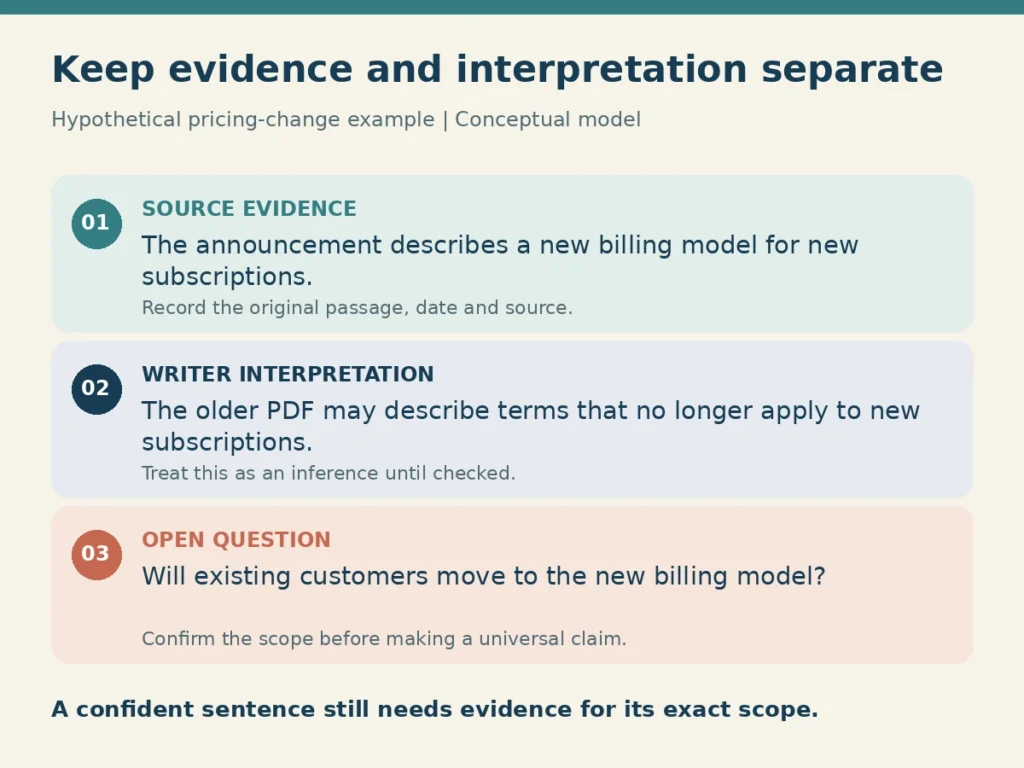
Separate evidence from interpretation
Use a small table rather than a polished summary that hides uncertainty. In this fictional example, the records might look like this:
| Material | What it supports | What it does not establish |
|---|---|---|
| Current announcement | A billing change is described | Whether every existing customer moves immediately |
| Current subscription help page | Which subscription groups its guidance covers | Whether it answers the announcement’s unresolved timing questions |
| Older pricing PDF | The earlier billing terms | Whether those terms remain current |
| Interview note | One person’s account of the change | A policy that applies to all customers |
Label your interpretation separately. An outdated PDF and a current announcement can differ without either being misquoted. Dates and scope may explain the difference. Until you establish that, keep the affected claim open.
Ask AI to surface gaps and disagreements
Give AI a comparison task before asking for prose. In an AI research workflow for writers, this is where an assistant can help organize the material while leaving unresolved questions visible.
Select the sources relevant to the pricing question and try:
Compare these selected sources for a newsletter about the pricing change. Separate explicit statements, possible interpretations, and unanswered questions. Identify the source and passage for each statement. Flag differences in date or customer scope. Do not resolve missing information by guessing.
Inspect the output as a proposed analysis. Check that the selected files or pages were actually used, and that the answer did not blur current policy with older terms. For more detail on setting the context, follow the guide to chat with your notes.
Verify the passage before using the claim
Open the original source. Read the surrounding text, not just the sentence identified by AI. Confirm dates, exceptions, and whether a statement describes a proposal or an effective policy.
If the announcement covers new subscriptions only, the draft should preserve that scope. If existing-customer treatment remains unclear, record the question or request clarification before publishing a definitive answer.
This review is part of the writing task. NIST’s Generative AI Profile provides broader guidance on evaluating trustworthiness and risks in generative AI systems. It does not certify this workflow or the accuracy of Brainfo’s answers.
Build an outline with evidence attached
Turn verified notes into an outline that answers the brief. Ask for a proposed structure with supporting source records under each section and a separate list of unresolved claims.
For the newsletter, give each proposed section an evidence note:
- What changed: use the announcement and older PDF to explain the difference; check their dates.
- Who is affected: use the subscription help page alongside the announcement; leave customer groups or timing unresolved when neither answers them.
- What readers should check: use the interview note to identify practical questions, while distinguishing one person’s account from official policy.
A useful way to evaluate Brainfo for writers is to build this outline in a document within the project space. Then make the editorial decisions yourself. Does the opening answer the reader’s main question? Does each section have sufficient evidence? Would removing an unsupported sentence change the argument?
An outline with an honest gap is ready for more research. An outline that silently fills the gap needs correction before drafting.
Draft one section from the relevant notes
To turn research notes into a draft, start with the section whose evidence is strongest. Give AI the brief, the section’s purpose, and only the notes needed for that section. Review the result before moving to the next one.
For the opening explanation of the pricing change, a prompt could be:
Draft this section for small-business readers using the attached verified notes. Explain the confirmed pricing change and its stated scope. Keep source references beside factual claims. Do not invent amounts, dates, quotations, or customer outcomes. Put any unsupported claim in a separate questions list. Use plain English and avoid promotional language.
The suggested references are not proof. Compare the paragraph with the notes and original passages. If the response introduces a fact absent from the supplied material, remove it or research it explicitly.
Give the prompt boundaries and a voice sample
Provide a short sample of your own approved writing when tone matters. Specify the aspects to retain, such as direct openings, short explanations, or restrained adjectives. Do not ask the model to invent first-person experience.
Ask for targeted changes once the substance is sound. A request to shorten a paragraph while preserving its exception is easier to assess than an unrestricted request to improve the whole article.
Research on co-writing with AI and writer control examines how agency and ownership vary across writing activities and writer needs. It supports treating control as an explicit consideration; it does not establish that one prompting method suits every writer.
Review the claims, then edit the prose
Make two passes. First, check evidence: can you locate support for each consequential statement, and does it support the exact wording? Then edit for clarity, flow, and voice.
Suppose the fictional announcement specifies new subscriptions but says nothing about existing customers. The older PDF still describes the previous terms. Here is how the evidence changes the draft:
| Draft version | Wording | Editorial decision |
|---|---|---|
| Before verification | All customers will move to the new billing model. | Remove: the supplied sources do not establish this scope. |
| After verification | The announcement describes a new billing model for new subscriptions. Existing-customer treatment still needs confirmation. | Keep the limited statement; resolve or clearly disclose the remaining question. |
These are invented teaching sentences, not quotations from a real announcement. Shortening the first sentence without checking its scope would only make the error easier to read.
In the web desktop workspace, Brainfo’s editor copilot can help summarize, rewrite, and tighten selected text. When evaluating Brainfo for writers, check how these edits affect a qualified statement. After a rewrite, confirm that the qualification, attribution, and reference are still present.
Prepare the draft for an editor
Brainfo supports real-time collaborative editing and flat inline comments. Before inviting an editor, check the space’s access settings and remember that members can edit. Mark which document is the working draft and which questions remain unresolved.
If you export a document, open the resulting file and inspect its headings, links, and references. Brainfo’s official features page lists document export formats including Word, PDF, Markdown, and HTML. Availability of a format does not prove that your evidence trail survives exactly as intended.
Keep the source records available to the reviewer. An editor should be able to identify why a claim is included without reconstructing your research from the beginning.
Where this workflow needs extra care
Core notes, documents, bookmarks, and tags remain available offline. AI chat, web research, and file upload need an internet connection. Plan those activities separately if you write while travelling.
Research uses selected material in manageable batches. Avoid assuming that one conversation has read your entire archive or every space. General workspace search uses keywords across titles and descriptions; do not rely on it to inspect the full text of every document. Deliberately select the material needed for deeper analysis.
A demanding citation style, manuscript format, or review process may require another tool. Keeping sources and drafts together does not automatically supply an academic bibliography or a publication-ready submission. The guide to research and writing apps can help evaluate those broader requirements.
Try the workflow on one active piece
Evaluate Brainfo for writers with a small project before moving a research archive. Bring in a brief and a focused source set, create one evidence-backed outline, and draft the section you can verify most confidently.
Judge the result by whether you can recover the source, correct an overstatement, and hand the paragraph to an editor with its context intact. If that fits your work, compare Brainfo with other platforms against your collaboration and output requirements.
Frequently asked questions
Is Brainfo for writers a good fit for research-heavy content?
It is worth evaluating when you want notes, documents, bookmarks, and AI assistance within the same workspace. Test it with your actual sources and review requirements. It does not remove the need to check evidence or make editorial decisions.
Can Brainfo help turn research notes into a first draft?
Brainfo’s AI can analyze selected material and help create notes or documents. Start with verified source notes and an outline, then draft one section at a time. Check factual statements against the original material before accepting the text.
Can I research and write offline in Brainfo?
Core notes, documents, bookmarks, and tags are available offline. AI chat, web research, and file upload require internet access. Prepare the material you need before disconnecting, and confirm that any separate source files are accessible on your device.
How should I check AI-generated source references?
Open each original source, locate the cited passage, and check its date, scope, and qualifications. Confirm that it supports the draft’s wording. If it does not, revise the claim or keep it out of the draft until you have evidence.
Can an editor collaborate on my draft in Brainfo?
Brainfo supports real-time collaborative editing and flat inline comments. Check access settings before sharing because members can edit. Keep the draft and relevant source records clearly identified so the editor can review both wording and evidence.