


Your project context is rarely in one tidy file. A decision may depend on last week’s meeting notes, a working document, and research you saved months ago. Opening a separate AI chat and explaining that context again takes work before the useful question even begins.
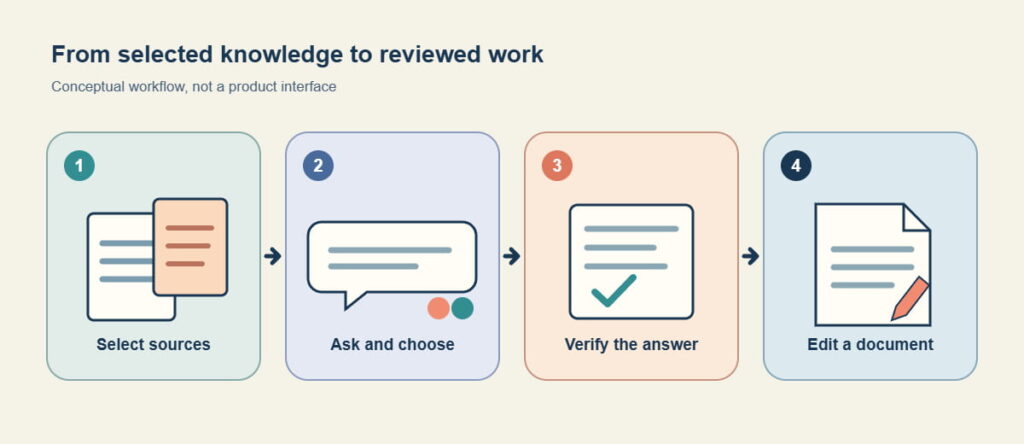
Brainfo AI brings model choice into the workspace where your knowledge lives. You can work with relevant notes, documents, and selected material, ask a focused question, and turn a useful chat into a document you can edit. The source material still matters: an AI answer is a starting point for review, not evidence that a decision is correct.
What Brainfo AI does with your knowledge
A general AI chat can help you brainstorm. Your own material lets you ask a narrower question: “Which decision is still open, and what evidence would settle it?”
Start with the material that belongs to the task. Ask for a specific output, such as a list of agreements, contradictions, and open questions. For the detailed source-selection method, see Brainfo’s guide to chatting with your notes.
Choose the context for the question
Do not assume a chat has read every item in your workspace. Point it toward the relevant content and keep the source set small enough to inspect. File research reads selected material in manageable batches. If the answer cites a decision or date that matters, return to the underlying document before using it.
Choose an AI model for the task in front of you
Brainfo brings multiple AI models into its workspace and lets you choose a model for the task. The catalog can change, so check the choices available when you start. Give model choice a job within the workflow:
| When you need to… | Ask for… | Check before moving on |
|---|---|---|
| Build a first decision memo | A draft with each recommendation separated from its supporting source | Whether the source actually supports the recommendation |
| Challenge that memo | A second model’s list of unsupported claims, conflicting evidence, and missing decisions | Whether the critique cites material you provided, rather than general assumptions |
| Make the result reusable | An editable document based on the reviewed chat | Dates, owners, unresolved questions, and wording in the final document |
Turn an answer into a document you can review
Consider a product manager preparing a launch decision from interview notes and a draft brief. A useful first request is: “Draft a decision memo. For each recommendation, name its supporting note and list any missing evidence.” A second pass with another available model can ask: “Which recommendations are not supported by those notes, and what would you ask the owner before approval?” Make sure the relevant material is in context for that pass. The critique is something to inspect, not a vote that settles the decision.
The manager checks the dates and claims against the originals, then turns the useful chat into an editable document. That document has a different job from the chat: it records the decision, evidence, owner, and remaining question in a form the team can revise. Brainfo describes chat-to-document creation on its AI page.
If you want prompts for other jobs, the Brainfo AI prompt collection covers writing, research, and organization. Begin with the material and the decision you need, then adapt the prompt.
Where agents fit, and where you remain in control
Some requests call for work in the workspace rather than another answer in a chat. Brainfo’s supervisor can pass a scoped request to specialist agents. The Writer creates or manages notes, documents, and bookmarks; the Organizer works with folders and tags; and the Researcher works with selected uploaded files and web pages.
For a project brief, name the sources and the desired output. For an organization task, name the items to change. “Organize this project” leaves too much open. “Create a tag for the launch research and apply it to these three selected documents” gives the action a clear scope. Destructive actions require an explicit Approve or Reject decision; safe reversible actions may run without that extra step.
Limits to check before you rely on an answer
Brainfo’s core notes, documents, bookmarks, and tags can remain available offline. AI chat, web search, and file upload require an internet connection. Do not plan an offline research session on the assumption that AI chat will run without one.
The scope of an answer is another limit. File research reads selected material in manageable batches. General workspace search uses keywords across titles and descriptions; do not expect it to inspect the full text of every document. Ask where an important claim came from. If a source is missing, outdated, or contradictory, resolve that issue in the original material before turning the answer into a recommendation.
Is Brainfo AI right for your knowledge workflow?
Brainfo AI is worth evaluating if your work repeatedly moves from saved notes and documents to a question, a draft, and a decision. The practical test is whether you can identify the relevant material, get a useful first answer, verify it, and keep working on the result in the same workspace.
If you mainly need a one-off chat with no connection to your own material, start with that simpler task. If comparing tools is part of the decision, compare Brainfo with other platforms while checking each feature and plan against current product details.
Next step: Choose one active project, gather a small set of relevant material, and test a question whose answer you can verify. If that workflow fits, Join the Waitlist.
Frequently asked questions
Can Brainfo AI use my notes and documents?
Yes, it can work with relevant notes, documents, and selected material. Specify the sources for your task rather than assuming every workspace item is automatically included.
Can I choose between AI models in Brainfo?
Brainfo describes multiple models and model switching. The available catalog can change. Check the current product before choosing a model for a particular task.
Can I turn an AI chat into a document?
Brainfo describes converting a chat into an editable document. Review facts and source references before sharing the result as a finished brief.
Does Brainfo AI chat work offline?
No. Core content can remain available offline, but AI chat, web search, and file upload require an internet connection.
Should I trust an answer based on my own material?
Check consequential dates, commitments, numbers, and conclusions against the original sources. Relevant context can make an answer more useful, but it cannot settle a contradiction by itself.





