

Modern knowledge work rarely suffers from a lack of apps; the bigger problem is that too many tools overlap without a clear role. A second brain stack solves this by organizing your tools into four connected layers: Capture, Knowledge, Action, and Creation.
Instead of forcing one app to do everything, each layer handles a specific part of the workflow—from capturing an idea to organizing it, turning it into action, and producing finished work.
In this guide, you’ll learn which second brain tools fit each layer, how the four layers work together, and how to build a personal knowledge system without constantly switching between disconnected apps.
Why Modern Knowledge Work Needs a Second Brain Stack
Imagine you’re working on a high-stakes project for work when your voracious appetite for learning kicks in.
Your head starts buzzing with new ideas, but by the time you finish your main task and return to the idea, your notes are barely coherent.
Worse, you’re drowning in a sea of tabs, bookmarks, and half-finished tasks scattered across Notion, Apple Notes, or Evernote, each app promising to be your “second brain” but delivering only obtuse workflows and overwhelming learning curves.
This is tool fatigue in action, a common plague for modern thinkers who chase the myth of the perfect tool.
In reality, no single app can handle the multifaceted demands of knowledge work.
That’s where the “second brain stack” comes in, a definitive mental model that shifts your focus from isolated second brain tools (like a standalone notes app) to a seamless, integrated productivity stack.
If you’re just starting to learn about second brain systems, make sure to check this blog on the topic.
By building this stack, you’ll create a system where information flows effortlessly from capture to creation, with each tool excelling in its specific role.

At Brainfo, we build software for the Knowledge Layer of personal knowledge management, so that’s naturally where our experience is strongest. In this guide, we compare that approach with established alternatives and focus on workflow fit rather than forcing every part of a second brain into one app.
The goal is simple: understand what each layer needs to do first, then choose the tool that performs that role with the least friction.
Understanding Tool Fatigue and the Need for a Second Brain Stack
Tool fatigue isn’t just annoyance; it’s a productivity killer.
Productivity nerds often fall into one of two traps:
The core problem? A lack of intentional architecture. Without a clear system, you’re left with lost information, duplicated efforts, and mental overload.
But what if you could achieve digital clarity? The ultimate goal is a seamless second brain stack that turns chaos into an elegant flow:
ideas captured instantly, synthesized deeply, actioned efficiently, and transformed into polished creations.
This isn’t about hype; it’s grounded in the “Stack” philosophy, which prioritizes principles over any one tool. Integration is key, tools should complement each other, not compete.
The practical advantage of this model is simpler: each tool has a defined role, reducing ambiguity about where information belongs and how it should move from capture to output.
Do not mention “internal research” here unless a real methodology, sample size, and supporting data can be published.
Answering the question, “What tools do I need for a second brain?” starts with understanding the four essential layers.
These aren’t arbitrary; they’re derived from proven frameworks like Tiago Forte’s Building a Second Brain, adapted through our experience helping professionals from tech entrepreneurs to graduate students.
Building a Second Brain: Capturing, Organizing, and Sharing Knowledge Using Digital Notes
The stack empowers you to move beyond tool-hopping, fostering a personal productivity system that’s resilient and scalable.
The Four-Layer Second Brain Stack: A Blueprint for Productivity
Think of your second brain stack as a well-engineered building: each layer supports the next, creating a sturdy foundation for knowledge work.
We’ll compare tools based on their role, ease of use, integration options, platform fit, and how well they hand information to the next layer. The goal isn’t to crown one universal winner—it’s to choose the right tool for each job.
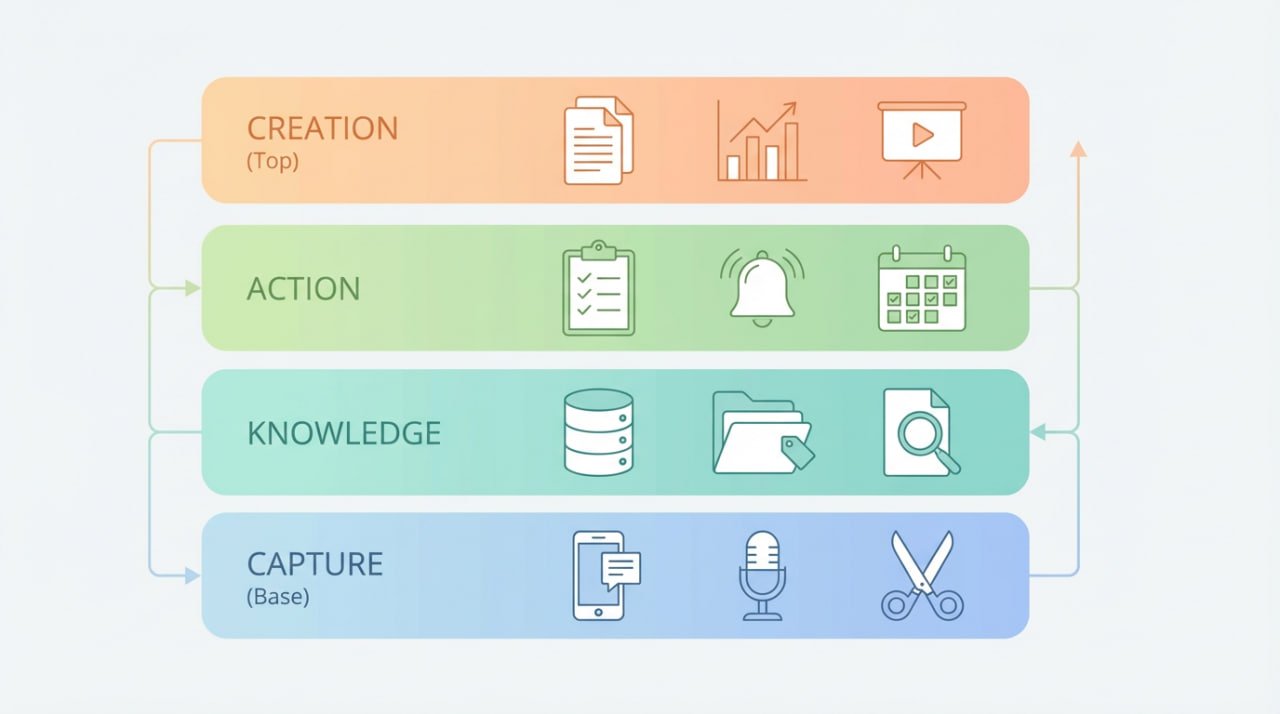
Adapt them to your needs; the goal is a customized productivity stack, not rigid adherence.
| Layer | Core Job | Example Tools |
|---|
| Capture | Save ideas, sources, and highlights quickly | Drafts, Apple Notes, Readwise Reader |
| Knowledge | Organize, connect, and retrieve information | Brainfo, Notion, Obsidian, Evernote |
| Action | Turn knowledge into tasks and next steps | Todoist, Things, Microsoft To Do |
| Creation | Draft, edit, and publish finished work | Google Docs, Grammarly, Canva |
Layer 1: The Capture Layer (Quick Ingestion)
The foundation of any effective second brain tools setup is quick ingestion. Ideas strike unpredictably during meetings, podcasts, or late-night scrolls, so your Capture Layer must be frictionless and omnipresent.
The best app for capturing ideas prioritizes speed over sophistication, ensuring nothing slips through the cracks.
While contemplating on this layer, you need to answer “What is the best app for capturing ideas?” by emphasizing ubiquity: If it’s not instant, it’s ineffective.
For fast capture, choose the tool you can access with the least friction. Drafts is built around quick text capture on iPhone, iPad, Mac, and Apple Watch, while Apple Notes is a natural choice for people already working across Apple devices.
For articles, web content, and reading highlights, Readwise Reader is a better fit because it is designed around saving reading material and keeping highlights in a dedicated reading workflow.
The important principle isn’t the specific app: your Capture Layer should make saving information almost effortless and then move useful material into your Knowledge Layer.
From here, data flows to the Knowledge Layer, reducing the digital friction that plagues disorganized systems.
Our experience with Brainfo integrations shows that strong capture habits alone can boost overall productivity.
Layer 2: The Knowledge Layer (Deep Thinking)
At the heart of the second brain stack is the Knowledge Layer, where raw inputs transform into interconnected insights.
This is your central hub for organizing, linking, and retrieving knowledge, think of it as the brain’s neocortex, enabling deep thinking and pattern recognition.
Brainfo is designed to serve as a dedicated Knowledge Layer for organizing and retrieving saved information.
Notion is a strong fit when your knowledge base needs collaborative documents, databases, and project context. Obsidian is better suited to users who prioritize local files, Markdown, and extensibility through plugins. Evernote remains a practical option for cross-device note capture, web clipping, and document scanning.
There isn’t a universal winner here. Choose your Knowledge Layer based on what matters most to your workflow: structured retrieval, collaboration, local control, flexibility, or frictionless capture.
The best knowledge tool is the one you can reliably return to when you need to find, connect, and use what you’ve saved.
Layer 3: The Action Layer (Task Management)
Knowledge without action is inert, so the Action Layer bridges thinking to doing. Here, insights become tasks, with tools focused on prioritization, reminders, and execution.
Todoist is our top pick for its natural language parsing and integrations; Things offers elegant macOS-native design for solo users, while Microsoft To Do suits enterprise environments with Outlook sync.
These outperform overloaded notes apps by specializing in deadlines and subtasks.
Drawing from David Allen’s Getting Things Done (GTD) framework, implement weekly reviews to know what’s ahead for your days.
Tips for the Weekly Review | GTD®
Layer 4: The Creation Layer (Polished Output)
Finally, the Creation Layer refines your work for the world. Optimized for drafting, editing, and sharing, these tools turn rough ideas into professional outputs.
Grammarly integrates everywhere for real-time edits; Google Docs excels in collaboration for documents. For visuals, Canva provides drag-and-drop ease.
Pull from prior layers: Export Notion syntheses into Brainfo’s docs, then polish with Grammarly. You can even use the help of the AI assistants in this part.
This layer completes the stack, ensuring your second brain tools culminate in tangible results, like reports, blogs, or presentations.
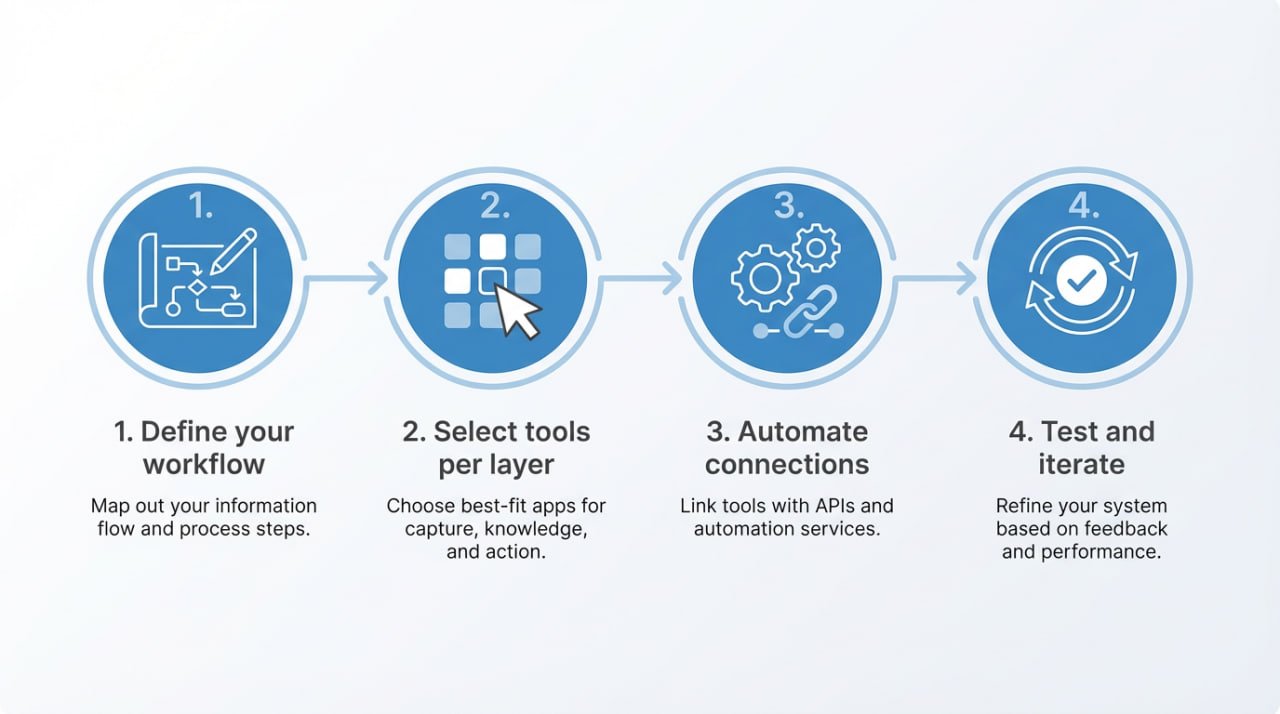
Building and Customizing Your Own Second Brain Stack
Now, let’s make this actionable. Building a personal productivity system starts with an audit: List your current tools and map them to the four layers.
Next, you need to identify gaps in these tools. Is it weak capture? Then add drafts. Is it overloaded on knowledge? Switch to a better knowledge management platform.
Start with the fewest tools possible: ideally one primary tool for each layer. Add another app only when it solves a specific problem in the handoff between Capture, Knowledge, Action, or Creation. A second brain should reduce cognitive load—not create another system you have to maintain.
This approach keeps the system flexible while preventing tool sprawl. Build the smallest stack that reliably supports your workflow, then expand it only when a real need appears.
How to Organise your Life – Building a Second Brain
Conclusion
The second brain stack liberates you from tool fatigue, empowering a system where capture, knowledge, action, and creation harmonize.
By embracing this philosophy, principles first, tools second, you’ll achieve the digital clarity knowledge workers crave.
Ready to architect yours? Start with Brainfo as your Knowledge Layer hub, sign up for a free trial at brainfo.ai and experience seamless integration.Tools evolve, but this stack’s timeless principles will endure.
Also, feel free to share your stack workflow with us. We’re here to refine them together, drawing on our ongoing commitment to trustworthy, expert guidance in personal knowledge management.
Frequently Asked Questions
1. What is a second brain stack?
A second brain stack is a workflow that assigns different tools to four roles: Capture, Knowledge, Action, and Creation. Information moves through these layers instead of being scattered across disconnected apps.
2. What are the best second brain tools?
There is no single best tool for everyone. A practical stack might use Drafts or Apple Notes for capture, Brainfo, Notion, Obsidian, or Evernote for knowledge, Todoist or Things for action, and Google Docs or Canva for creation. The best combination depends on your workflow and platforms.
3. Do I need multiple apps to build a second brain?
Not necessarily. One app can cover more than one layer, but each role should remain clear. If a single app handles several jobs without adding friction, keep it. Add specialized tools only when they solve a specific workflow problem.
4. How do I build a second brain stack?
Start by auditing the tools you already use. Assign each one to Capture, Knowledge, Action, or Creation, remove unnecessary overlap, connect the handoffs between layers, and test the workflow before adding more tools.
5. Do I need AI second brain tools?
No. AI can improve search, retrieval, summarization, and synthesis, but it isn’t a requirement for a useful second brain. The underlying workflow—capturing, organizing, acting on, and creating from knowledge—matters more than any individual AI feature.
How does customizing the creation layer impact the overall output quality in a second brain workflow?
Tailored tools for editing, collaboration, and visuals refine rough ideas into professional results, amplifying the value of prior layers’ efforts.