

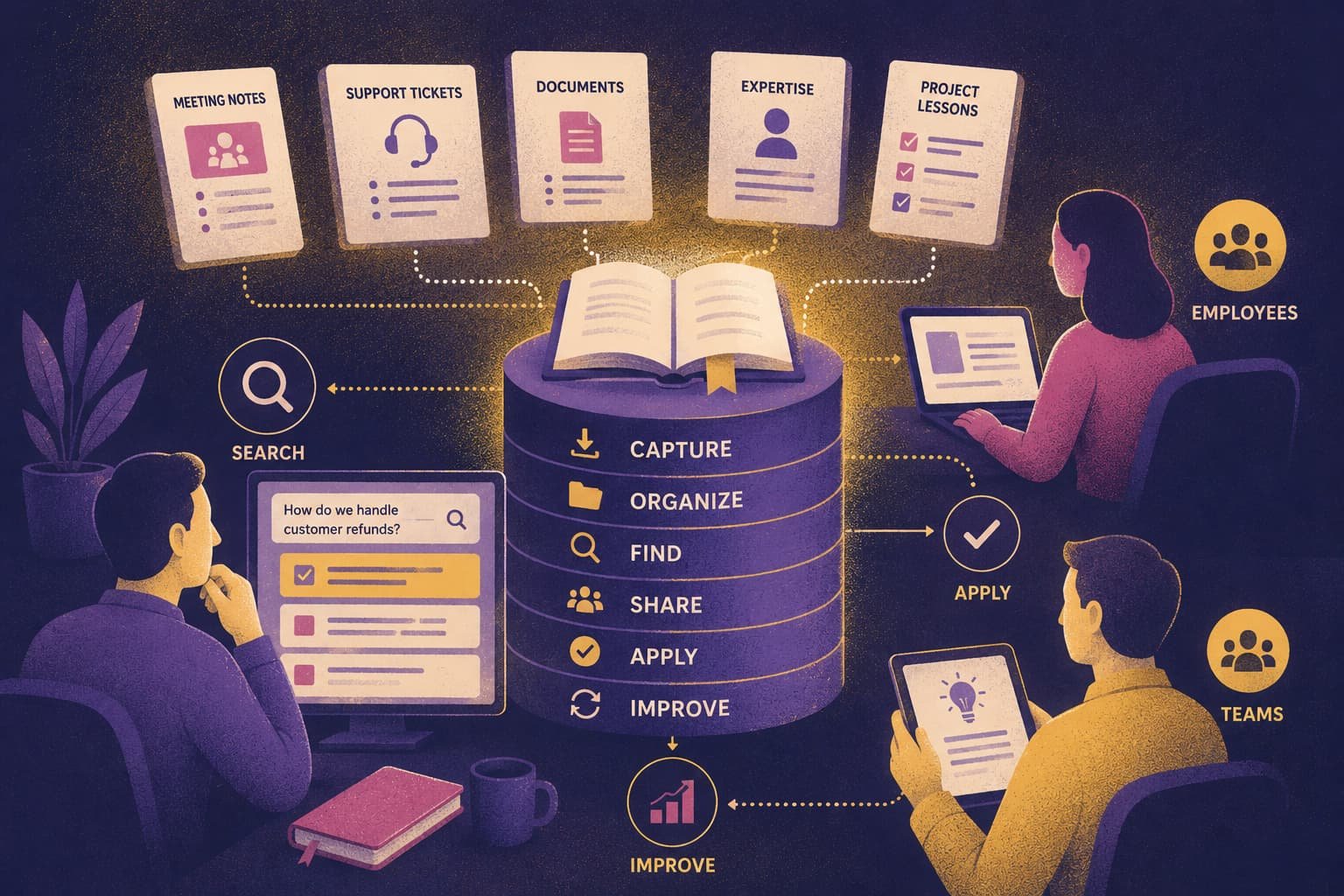
Organizations rarely have a knowledge shortage.
They have a retrieval problem.
A product decision is buried in meeting notes. A proven solution lives inside an old support ticket. The person who understands a critical process best is away this week.
The knowledge exists. Finding the right piece at the right moment is the difficult part.
Knowledge management systems turn scattered information into something people can find, trust, and reuse.
Software matters, but simply creating another repository does not solve the problem. A useful system also needs ownership, review, search, clear structure, and habits that keep important information current.
Otherwise, you have not created a knowledge system.
You have created another place for digital clutter.
This distinction becomes even more important when AI enters the workflow. AI can shorten the path from a question to an answer. But if the underlying source is outdated, AI can also deliver the wrong answer faster.
In this guide, we’ll cover:
What Is a Knowledge Management System?
A knowledge management system, usually shortened to KMS, combines people, processes, content, and technology to capture, organize, retrieve, share, and apply knowledge.
The American Productivity & Quality Center describes knowledge management as a structured process for getting information and knowledge to the right people at the right time.
ISO 30401:2018 approaches it as a management system that organizations establish, implement, maintain, review, and improve.
Both definitions lead to a practical question:
Can someone use what the organization already knows to complete real work?
A shared folder can store documents.
A working KMS goes further.
It helps people understand:
- What belongs in the system
- Who owns important information
- Which version is current
- How to find an answer without knowing the exact filename
That operating layer is what separates useful knowledge management from simple storage.
Knowledge Management vs. the System That Supports It
Knowledge management is the practice of helping knowledge move through an organization.
A knowledge management system is the structure that supports that practice.
That structure may include:
- Software
- Publishing rules
- Review schedules
- Access controls
- Search
- Named content owners
Remove those operating decisions and the technology becomes another place to save files.
The platform matters.
How people use it matters more.
KMS vs. Knowledge Base, CMS, and Document Management
These categories often overlap, which is why vendor terminology can become confusing.
A better way to separate them is to ask what job each system is primarily expected to do.
| System | Primary job | Typical material | Common users |
|---|---|---|---|
| Knowledge management system | Support the full knowledge lifecycle | Documents, expertise, decisions, lessons, discussions, and procedures | Employees, teams, customers, or individuals |
| Knowledge base | Answer recurring questions | FAQs, tutorials, troubleshooting articles, and policies | Customers or employees |
| Content management system | Create and publish digital content | Web pages, articles, media, and marketing content | Editors, marketers, and web teams |
| Document management system | Store and control formal files | Contracts, reports, forms, and records | Operations, legal, and administration teams |
| Learning management system | Deliver and track structured learning | Courses, lessons, tests, and certifications | Learners, instructors, and HR teams |
A knowledge base, wiki, document repository, or learning platform can all exist inside a broader knowledge management system.
The boundary depends on how your organization captures, governs, finds, and applies knowledge across the workflow.
Personal vs. Organizational Knowledge Management
A personal knowledge management system helps one person capture sources, connect ideas, retrieve earlier work, and reuse what they have learned.
An organizational KMS has a more difficult job.
Several people must be able to understand and trust the same material.
That requires additional layers such as:
- Shared standards
- Permissions
- Content ownership
- Collaboration
- Review processes
If your focus is primarily your own notes, ideas, and research, see this separate guide to personal knowledge management.
Keeping the two problems separate is useful.
A team knowledge system should not quietly turn into a second-brain tutorial.
How Knowledge Management Systems Work
A useful knowledge management system moves knowledge through five connected stages:
Capture → Organize → Find → Apply → Improve
The sequence looks simple.
Running it consistently is the difficult part.

1. Capture Knowledge Worth Keeping
Knowledge enters a system from many places:
- Project notes
- Support conversations
- Research
- Process documents
- Interviews
- Reviews of completed work
The goal is not to save everything.
Keep material that another person is likely to reuse.
For example:
- A decision and the reasoning behind it
- A repeatable process
- A solution to a recurring problem
- A lesson from a finished project
- Expertise that would be difficult to replace
Tacit knowledge is usually harder to capture.
An experienced technician may recognize a failure pattern immediately but struggle to document the diagnosis from a blank page.
In that situation, a recorded walkthrough or short interview may capture more useful knowledge than another empty documentation template.
2. Organize and Govern It
Captured information needs enough structure to remain understandable later.
Useful context often includes:
- Clear titles
- Owners
- Dates
- Status labels
- Permissions
- Links to related work
These signals are often more valuable than building a complicated folder hierarchy.
Start with the structure people need to find and evaluate an answer.
Add another category only when a real retrieval problem requires it.
3. Make the Answer Findable
Search is where a knowledge management system proves whether it works.
A user should not need to remember:
- The exact filename
- The exact folder
- The vocabulary used by the original author
Keyword search, filters, metadata, and navigation still handle much of this work.
Semantic search can go further by helping when a person remembers the meaning of something but not the original wording.
But better search does not fix bad knowledge.
If three policy pages give three different answers, retrieval has simply exposed a governance problem.
4. Apply Knowledge During Real Work
Stored knowledge becomes valuable when it changes what someone does.
A support agent retrieves an approved fix.
A product manager finds the reasoning behind an earlier roadmap decision.
A project team reviews lessons from a similar launch before estimating the next one.
That is the outcome to measure.
Reuse matters. Page count does not.
5. Review What People Rely On
Knowledge ages.
Products change. Policies expire. Procedures improve.
Critical information therefore needs both an owner and a review trigger.
A trigger might be:
- A scheduled review date
- A product release
- A policy change
- Feedback from someone who discovered a gap
Not every note needs the same level of governance.
A low-risk working note can follow a lighter process than regulatory or security guidance.
Review frequency should follow risk.
The Parts That Make a KMS Work
APQC’s model identifies people, process, content and IT, and strategy as core components of knowledge management.
In practice, five questions reveal most weaknesses in a knowledge system.
Who Owns the Knowledge?
Someone contributes information.
Someone verifies high-impact claims.
Someone keeps critical material current.
In a small organization, one person may handle all three responsibilities.
That is fine.
What matters is that responsibility is visible.
“Everyone owns it” is rarely an ownership model.
What Happens to Content Over Time?
Every important piece of content should have a lifecycle.
It may move from:
Draft → Approved → Revised → Archived or Deleted
High-risk guidance may require formal approval.
A team working note may only need an owner and a visible status.
Use the lightest process that still protects accuracy.
Does the Content Carry Enough Context?
A reusable piece of knowledge should tell the next reader enough to act.
Ideally, they should understand:
- Who the content is for
- What problem it solves
- When it applies
- Who approved it
- Where the source came from
This context prevents a future reader from having to reconstruct the original conversation.
Does the Technology Fit the Workflow?
Knowledge management tools may include:
- Authoring
- Search
- Version history
- Permissions
- Comments
- Import and export
- Collaboration
- AI assistance
Feature lists can be misleading.
A product may offer dozens of advanced capabilities and still fail the team.
For example, if support agents spend their day inside a ticketing system, a knowledge platform that forces constant tab switching already has an adoption problem.
The system needs to fit the work.
Not the other way around.
What Business Result Should Improve?
“Centralize our knowledge” sounds useful, but it is too broad to guide implementation.
Compare it with:
Give the support team one approved place for current troubleshooting procedures.
Now the goal identifies:
- The users
- The content
- The ownership requirement
- The expected outcome
That is specific enough to test in a pilot.
Seven Common Types of Knowledge Management Systems
There is no official seven-part taxonomy for knowledge management systems.
Many platforms overlap, and one product may support several models.
Still, these categories are useful because each starts with a different knowledge problem.
1. Document and Content Management Systems
These systems focus on formal files and published content.
They work well for:
- Policies
- Contracts
- Technical documentation
- Reports
- Controlled procedures
They are especially useful when versions and permissions matter.
The weakness is often context.
A perfectly controlled document can still be difficult to discover or connect to related expertise.
2. Internal Knowledge Bases and Enterprise Wikis
An internal knowledge base gives employees a shared place for:
- Procedures
- Onboarding guides
- Product information
- FAQs
- Decision records
The model is easy to understand.
Maintenance is the difficult part.
Pages accumulate quickly when nobody is responsible for keeping them accurate.
3. Collaboration and Knowledge-Sharing Platforms
Collaboration platforms capture knowledge through:
- Shared pages
- Comments
- Discussions
- Project work
They are useful for fast-changing topics that require input from several people.
But collaboration creates another problem.
Important decisions can disappear inside long conversations.
Teams need a habit of turning the final conclusion into a durable record.
4. Expert and Decision-Support Systems
These systems connect users with specialized guidance through:
- Documented rules
- Expert directories
- Software recommendations
Common use cases include:
- Technical diagnosis
- Compliance
- Internal consulting
- Complex support
When guidance can have significant consequences, sources should remain visible and human review should have a clear place in the process.
5. Learning and Knowledge-Transfer Systems
Learning platforms turn knowledge into:
- Courses
- Lessons
- Assessments
They fit areas such as:
- Employee training
- Certification
- Product enablement
- Compliance education
A course works when someone needs to learn a subject.
It is inefficient when they need one answer in 30 seconds.
6. Personal Knowledge Management Systems
Personal systems organize an individual’s:
- Notes
- Saved sources
- Ideas
- Projects
Features such as linked notes, bookmarks, tags, search, and knowledge graphs can help researchers, writers, students, and product managers reconnect earlier thinking.
But personal organization is only part of the problem.
Shared ownership and governance are what turn this model into an organizational knowledge system.
7. Cloud-Based and AI-Powered Systems
Cloud platforms make shared information available across locations.
AI can add capabilities such as:
- Semantic retrieval
- Summarization
- Classification
- Question answering
- Actions inside the workspace
These features can reduce friction.
They also create new questions:
- How reliable are the sources?
- Which permissions does AI respect?
- What happens to private information?
- Can data be exported?
- Where does human control remain?
These questions should be part of the selection process.
Not fine print you investigate after purchasing the platform.
Benefits and Business Use Cases
The practical benefit of a KMS is simple:
It shortens the path from a question to a trustworthy answer.
How that value appears depends on the team.
Knowledge Workers Can Resume Earlier Thinking
A product manager can recover the research behind an old decision.
A writer can reconnect a source with earlier notes.
An analyst can reuse a method instead of rebuilding it from memory.
This is where digital knowledge management becomes more than file organization.
The system helps people continue earlier thinking.
Small Businesses Can Reduce Key-Person Risk
Small teams often depend heavily on a founder or long-serving employee.
That person becomes the answer to every recurring question.
Documenting areas such as:
- Routine operations
- Vendor details
- Customer guidance
- Decision rules
reduces that bottleneck.
The system does not have to be complicated.
A five-person team does not need an enterprise taxonomy committee.
Customer Service Teams Can Publish Consistent Guidance
A public knowledge base can provide self-service material for customers.
A private knowledge layer can give support agents:
- Diagnostic steps
- Escalation rules
- Approved product guidance
Microsoft’s Dynamics 365 documentation describes a knowledge lifecycle that includes authoring, categorizing, delivering, analyzing, and sharing knowledge-base content.
Publishing is part of the lifecycle.
It is not the finish line.
New Employees Can Find the Operating Context
Good onboarding requires more than a folder of documents.
A new employee should be able to find:
- Role expectations
- Team language
- Good examples
- Current procedures
- The people responsible for each area
Human coaching still matters.
The KMS simply removes much of the repetitive scavenger hunt around it.
Project Teams Can Recover Lessons Before Repeating Mistakes
A retrospective has little value if nobody can find it when the next project begins.
Reusable lessons should be linked to:
- Project type
- Affected process
- Future planning workflows
The useful moment is not immediately after the retrospective.
It is before the next estimate, decision, or launch plan is approved.
Knowledge Management System Examples
A useful KMS example should begin with the problem.
Not the product.
An Internal Operations Hub
A growing company keeps:
- Policies
- Onboarding material
- Recurring procedures
- Decision records
in one shared workspace.
Every critical page has an owner and a review date.
Employees can also flag outdated instructions when they find them.
A Customer Self-Service Centre
A software company publishes:
- Setup guides
- Troubleshooting articles
- FAQs
Customers use the public layer.
Support agents use a private layer containing internal diagnostics and escalation procedures.
Both collections describe the same product.
They serve different audiences.
A Project Lessons Library
A consulting team extracts reusable information from each engagement:
- Decisions
- Risks
- Templates
- Recommendations
The team tags this material by project type and problem.
That makes lessons discoverable before the next project begins.
A Personal Research Workspace
A researcher keeps:
- Papers
- Notes
- Bookmarks
- Personal interpretations
together.
Search helps retrieve known material.
Links reveal related ideas.
AI may summarize a source, but important conclusions are checked against the original.
Examples of Established Software
The products below represent different positions in the market.
This is not a ranking.
| Platform | Common knowledge-management role |
|---|---|
| Microsoft SharePoint | Organizational sites, pages, documents, and Microsoft 365 knowledge resources |
| Atlassian Confluence | Shared team documentation and collaborative knowledge spaces |
| Salesforce Knowledge | Customer service knowledge and self-service content |
| Zendesk | Support-focused internal and external knowledge resources |
| Brainfo | Local-first knowledge work combining notes, docs, bookmarks, AI chats, controlled agent actions, and team collaboration |
Microsoft presents SharePoint as part of its Microsoft 365 knowledge-management resources.
Atlassian describes Confluence as a workspace for creating and sharing team knowledge.
Salesforce positions its system around capturing, organizing, and retrieving business knowledge for employees and customers.
These descriptions explain what each platform is designed to do.
They do not prove which platform fits your workflow.
How AI Changes Digital Knowledge Management
AI makes internal information easier to retrieve, summarize, and act on.
That creates a major opportunity.
It also creates a new failure mode:
Weak source material can now reach the user faster.

Semantic Search Can Reduce Vocabulary Problems
Traditional keyword search looks for the words someone typed.
Semantic search looks for related meaning.
That is useful when a user remembers the concept but not the title or wording of the original document.
But semantic retrieval still depends on:
- Source quality
- Access controls
A more capable search layer can still surface the wrong document with impressive confidence.
AI Can Help Structure Incoming Knowledge
Depending on the platform, AI may help:
- Summarize documents
- Suggest tags
- Identify possible duplicates
- Extract action items
- Turn conversations into drafts
This can reduce repetitive work.
But important content still needs:
- A visible source
- A responsible owner
Treat AI output as a starting point.
Not automatically as approved knowledge.
Agents Raise the Cost of a Mistake
A chatbot produces an answer.
An agent may be able to:
- Create content
- Organize information
- Update material
- Delete workspace content
- Act through connected tools
That changes the risk.
More capability requires stronger controls, including:
- Scoped permissions
- Visible actions
- Reversible changes
- Approval before destructive operations
The NIST AI Risk Management Framework provides a broader voluntary structure for considering trustworthiness during the design, use, and evaluation of AI systems.
Governance Becomes Part of AI Quality
APQC’s guidance on knowledge and AI highlights a fundamental issue:
Outdated, duplicated, or poorly owned information can be amplified into AI-generated answers and workflows.
Governance therefore affects AI quality directly.
Useful practices include:
- Clear ownership
- Approval
- Review triggers
- Archiving rules
The sequence matters.
Clean the source material first. Then add automation.
How to Choose Knowledge Management Software
Do not start with a feature comparison.
Start with the job.
Write one sentence that names the users and the result you want.
For example:
Help product and support teams find the latest approved answer to recurring customer questions.
Then ask:
- What knowledge belongs in the system?
- Who creates, reviews, and maintains it?
- Who needs access?
- How will people find an answer when they do not know its title?
- How will readers distinguish drafts from approved guidance?
- Which existing tools must connect to the workflow?
- Does the team need simultaneous editing, comments, or shared spaces?
- Which content must remain available offline?
- Can the organization export its data in usable formats?
- How are AI sources, permissions, and actions controlled?
After that, test shortlisted platforms with your own information.
Give an unfamiliar colleague a few real tasks:
- Find an answer
- Identify the current version
- Update a procedure
- Restrict a sensitive item
- Export the content
- Recover something archived
A polished demo can show you features.
It is not a workflow test.
How to Create and Implement a Knowledge Management System
A knowledge management implementation does not need to begin with the entire organization.
In most cases, it should not.
Start with one painful workflow.

Step 1: Define the Problem
Identify the recurring friction.
For example:
- Support agents cannot find approved fixes
- New employees repeat the same questions
- Project decisions disappear after meetings
The narrower the problem, the easier the pilot is to evaluate.
Step 2: Audit Existing Knowledge
Look where knowledge already exists:
- Shared drives
- Chat
- Ticketing tools
- Wikis
- Training material
- The people everyone asks for help
Then classify what you find.
Is it:
- Useful?
- Duplicated?
- Obsolete?
- Risky?
- Missing?
Do not migrate the whole attic.
Step 3: Choose a Small Pilot
Choose a problem that is:
- Frequent
- High value
- Clear in audience
- Supported by a willing owner
A product team might begin with decision records for one active product area.
A support team might begin with the ten issues generating the most repeated questions.
You are testing a workflow.
Not building the final company-wide architecture.
Step 4: Set Ownership and Structure
Define:
- Content types
- Minimum metadata
- Permissions
- Approval rules
- Review triggers
- Archive policy
Keep the first version simple enough that you can explain it quickly.
Complexity can come later if real usage requires it.
Step 5: Test Technology Against Real Tasks
Use actual sample content from the pilot.
Test:
- Retrieval
- Updates
- Permissions
- Version history
- Export
- Recovery
- Source visibility for AI answers
This reveals problems that a generic product demonstration may never show.
Step 6: Clean Before Migration
Before moving knowledge into the new system:
- Remove duplicates
- Confirm accuracy
- Add missing context
- Assign owners
- Preserve original sources where necessary
Migration is not just a copying project.
It is a quality project.
Step 7: Train People Around the Workflow
Do not begin training with a tour of every menu.
Show people how to:
- Find a trusted answer
- Contribute useful information
- Flag outdated material
- Update the content they own
Teach the workflow first.
The rest of the interface can wait.
Step 8: Measure the Original Problem
Record a baseline before launch.
After the pilot begins, monitor signals such as:
- Failed searches
- Repeated questions
- Time required to find approved information
- Overdue reviews
- Reuse
- User feedback about trust
Page views can tell you that someone opened a page.
They cannot tell you whether the answer helped.
Knowledge Management System Best Practices
A useful KMS is rarely the one with the most content.
It is the one people can actually use.
Write for the Future Search
Use:
- Clear titles
- Familiar language
- Useful metadata
- Links between related information
Imagine the phrase a colleague will type six months from now.
Write for that person.
Put an Owner on Critical Content
An owner does not need to personally write every update.
They can delegate the work.
But someone should remain responsible for keeping critical information trustworthy.
Make Contribution Lightweight
Templates can improve consistency.
Too many mandatory fields do the opposite.
If adding one useful lesson requires completing 14 fields, people will start saving that knowledge somewhere easier.
Keep the fields that improve:
- Retrieval
- Context
- Governance
Remove the rest unless they solve a real problem.
Separate Drafts From Verified Guidance
A brainstorm and an approved policy should not look equally authoritative.
Use clear distinctions such as:
- Status labels
- Separate spaces
- Permissions
Users should understand what they can safely rely on.
Review According to Risk
Not every page requires the same review schedule.
Prioritize information where an outdated answer could cause:
- Legal harm
- Financial harm
- Security problems
- Operational problems
- Customer harm
Informal notes can use a lighter process.
Measure Usefulness Instead of Volume
More pages may mean better coverage.
They may also mean more clutter.
Track whether people can:
- Find knowledge
- Trust it
- Reuse it
That is a better measure of system health.
| Failure | What it looks like | Better response |
|---|---|---|
| Tool-first implementation | Software is chosen before the problem is defined | Start with one audience and workflow |
| Overbuilt taxonomy | Contributors cannot classify content confidently | Begin with a few clear categories |
| Missing ownership | Pages age without anyone noticing | Assign owners to critical content |
| Migration without cleanup | Duplicates and obsolete files flood the new system | Curate before moving |
| Search without governance | Users find several conflicting answers | Mark authoritative content and archive old versions |
| AI without source control | Fluent answers rely on weak or unauthorized material | Govern sources, permissions, and review |
| No feedback loop | Users work around the system silently | Make gaps and outdated content easy to report |
How Brainfo Supports Modern Knowledge Work
Knowledge work becomes easier when capture, research, organization, and writing do not happen across disconnected tools.
Brainfo brings notes, documents, bookmarks, and AI chats into one workspace for individual and team knowledge work.
The important point is not simply having several content types in one app.
It is keeping them available inside the same knowledge workflow.
Different Knowledge Gets an Appropriate Format
Not every piece of knowledge belongs in the same container.
A quick note is different from:
- A saved source
- A working AI conversation
- A finished report
Brainfo keeps these as distinct content types.
They can then be organized in personal, shared, or team spaces using folders and tags.
Core Content Remains Available Offline
Notes, documents, bookmarks, and tags live on the device first and sync when the connection returns.
Some features still require an internet connection, including:
- AI chat
- Web research
- File uploads
For that reason, the accurate description is offline-capable content, not a fully offline AI platform.
That distinction matters.
Specialist Agents Can Act Inside the Workspace
Brainfo uses a supervisor agent that delegates work to three specialists:
- Organizer — works with folders and tags
- Writer — creates and manages notes, documents, and bookmarks
- Researcher — reads selected uploaded files and web pages
File research happens on demand and a batch at a time.
It should not be described as unlimited context.
Destructive Actions Wait for Approval
Brainfo classifies agent actions as:
- Read
- Write
- Destructive
Safe and reversible actions can proceed directly.
Permanent deletion requires an approval card first.
The principle is simple:
Human review should appear where a mistake becomes difficult to undo.
Teams Can Edit Together
Brainfo supports:
- Real-time document editing
- Live presence
- Inline comments
- Team spaces
Members can edit content.
Owners and admins manage settings.
There is currently no separate viewer role.
Workspace search is also currently keyword-based across titles and descriptions.
Brainfo should therefore not yet be described as offering semantic or vector search across the entire workspace.
The current fit is strongest for knowledge workers and small teams that want:
- Local-first content
- Shared documents
- Research
- Controlled AI actions
in one environment.
Teams that require fully offline AI, a viewer role, a built-in scheduler, or native one-click MCP integration should account for those limitations when evaluating the product.
You can also review the Brainfo comparison pages before testing a pilot.
Frequently Asked Questions
What Is a Knowledge Management System?
A knowledge management system combines people, processes, content, and technology to capture, organize, find, share, and apply knowledge.
It may support:
An individual
An organization
Employees
Customers
Several of these groups at the same time
What Are the Main Types of Knowledge Management Systems?
Common types include:
Document management systems
Knowledge bases
Enterprise wikis
Collaboration platforms
Expert systems
Learning platforms
Personal knowledge systems
AI-powered or cloud-based platforms
The categories frequently overlap.
What Is an Example of a Knowledge Management System?
An internal company hub containing approved procedures, onboarding guides, decision records, and searchable project lessons is one example.
Other examples include:
A customer help centre
A connected personal research workspace
The defining question is whether the system helps people capture, find, trust, and reuse knowledge.
How Do You Create a Knowledge Management System?
Start with one recurring knowledge problem.
Then:
Audit the relevant information.
Choose a small pilot.
Define ownership and structure.
Select suitable technology.
Migrate verified content.
Train people around real tasks.
Measure whether retrieval and reuse improve.
Do not begin by attempting to catalogue everything the organization knows.
What Is the Difference Between a KMS and a Knowledge Base?
A knowledge base primarily stores answers and instructional content.
A knowledge management system supports the broader lifecycle around that content, including:
Capture
Validation
Organization
Sharing
Application
Governance
Improvement
A knowledge base can therefore be one part of a larger KMS.
Start With One Painful Workflow
You do not need to solve organization-wide knowledge management on day one.
Start with one question people ask repeatedly.
Find the best available answer.
Give that answer:
Then test what happens.
Can people find it?
Can they trust it?
Can they reuse it during real work?
If the answer is yes, the pilot is working.
Expand from there.
And if that workflow needs notes, documents, saved research, team editing, and controlled AI actions in one workspace, compare Brainfo with other knowledge tools and test the approach with a small set of real content.





