

Most digital filing systems do not become messy all at once. They become messy one reasonable folder at a time.
You start with Work. Then Projects. Then Current Projects. Then a client folder. Six months later, finding one document means clicking through five levels or searching your entire drive and hoping you remember part of the filename.
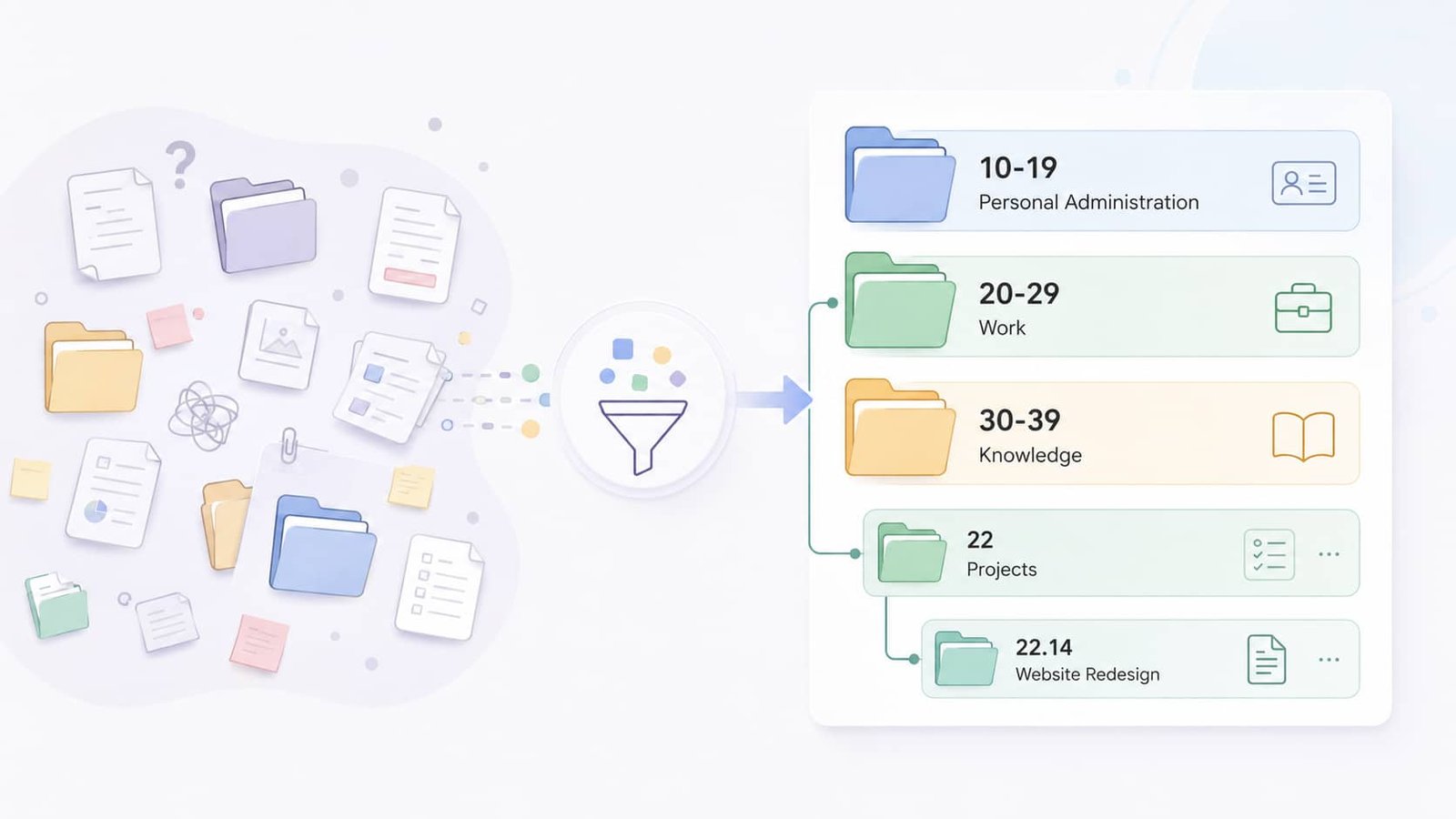
Johnny.Decimal takes a different approach: instead of letting your folder tree grow forever, it gives important information a stable numerical address.
The numbers look strange for about five minutes. Once you understand what they represent, the logic is simple – and that simplicity is the point.
In this guide, we’ll break down:
By the end, you should be able to build a small Johnny.Decimal system, test it in real work, and decide whether stable numerical addresses actually make your information easier to retrieve.
What is the Johnny Decimal system?
Johnny.Decimal is a system for organizing information into numbered areas, categories, and IDs. It was created by Johnny Noble around a simple idea: information is easier to find when it has a predictable place and a short reference you can reuse.
Instead of building an open-ended folder tree, Johnny.Decimal gives you a constrained structure:
Areas > Categories > IDs
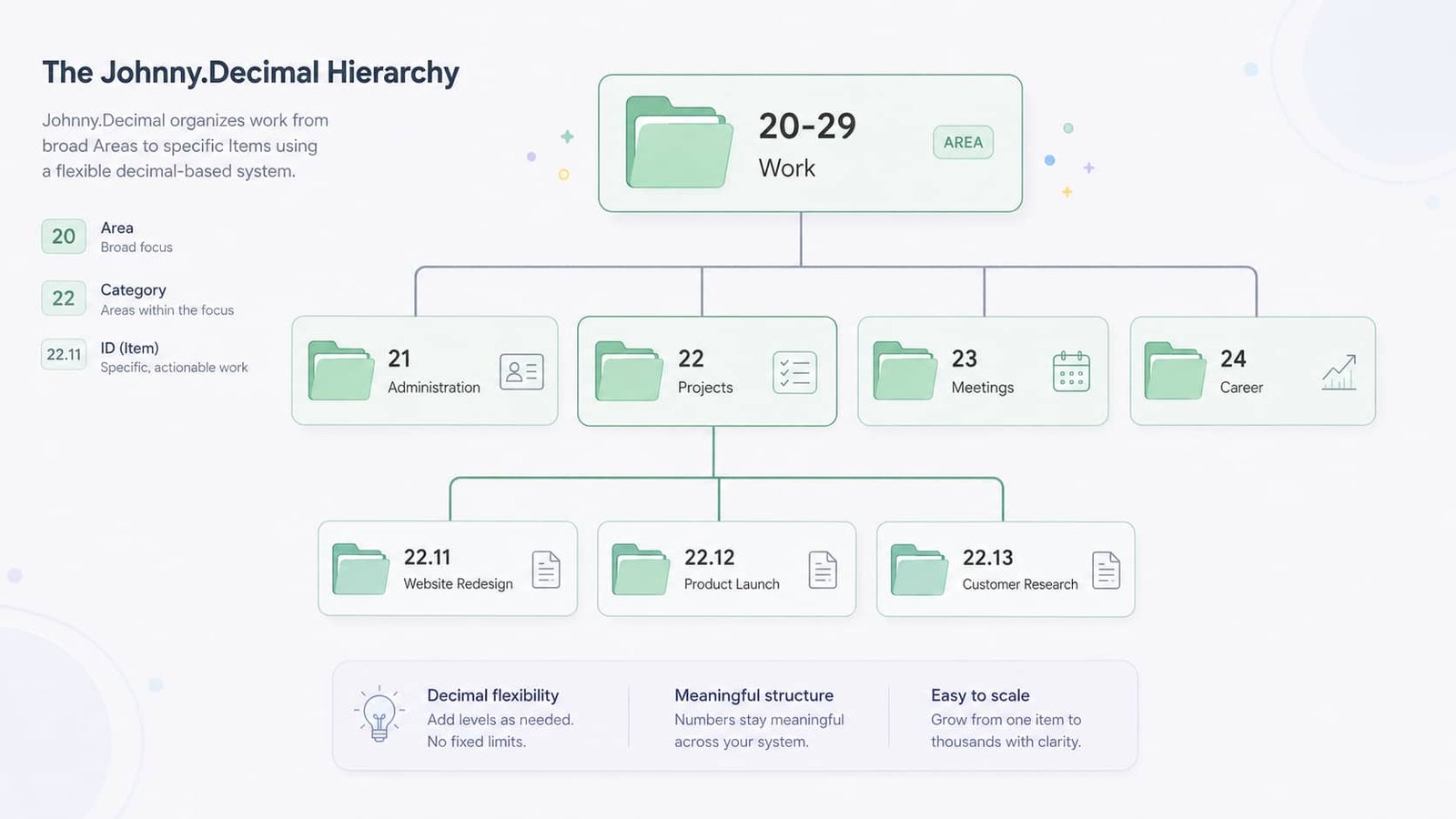
Suppose your work information belongs in:
20-29 Work
Inside that area, you might have categories such as:
Then individual projects inside 22 Projects receive IDs:
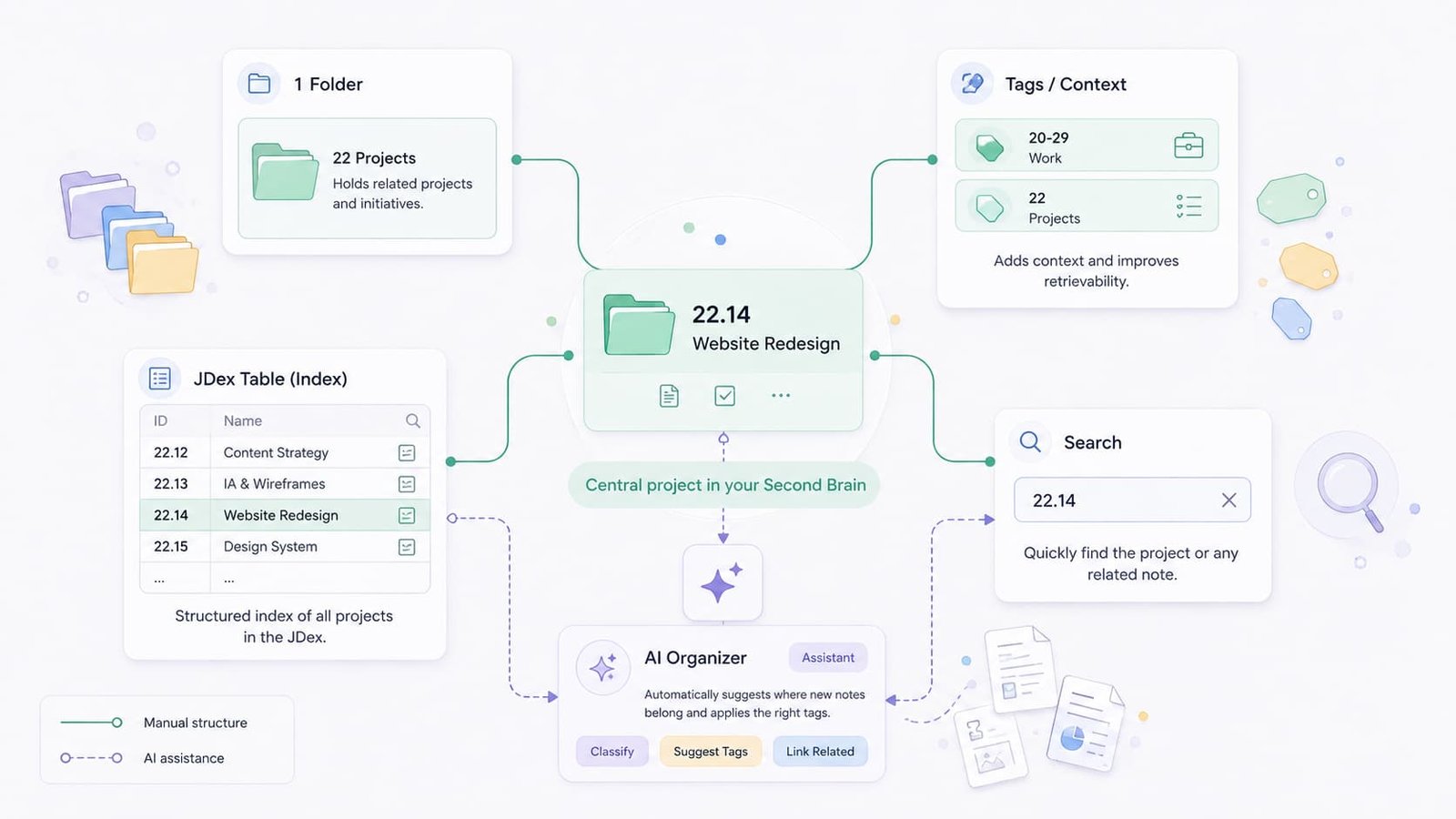
Now 22.12 is more than a number. The 22 tells you the category, and the .12 identifies one specific item inside it. In Johnny.Decimal, the number is not a mathematical value; it is a compact address.
Why Johnny Decimal uses numbers
Alphabetical folders move. Add Accounting and the list shifts. Add Archive and it shifts again. Numbered folders keep their relative position, which gives you a chance to learn the map of your system over time.
Even if you forget the exact ID of a project, you may still remember that it lives somewhere in 22. That already narrows the search from your entire workspace to one category.
The other advantage is reference. You can put 22.14 in a meeting note, task, document title, or message and use the same short ID to point back to the same project wherever that project appears.
Then individual projects inside 22 Projects receive IDs:
Now 22.12 is more than a number. The 22 tells you the category, and the .12 identifies one specific item inside it. In Johnny.Decimal, the number is not a mathematical value; it is a compact address.
Why Johnny Decimal uses numbers
Alphabetical folders move. Add Accounting and the list shifts. Add Archive and it shifts again. Numbered folders keep their relative position, which gives you a chance to learn the map of your system over time.
Even if you forget the exact ID of a project, you may still remember that it lives somewhere in 22. That already narrows the search from your entire workspace to one category.
The other advantage is reference. You can put 22.14 in a meeting note, task, document title, or message and use the same short ID to point back to the same project wherever that project appears.
How Johnny Decimal works
A standard Johnny.Decimal system has three core components: areas, categories, and IDs. The method deliberately limits how large each part can become.
- Up to 10 areas in a standard system
- Up to 10 categories in each area
- Up to 100 IDs in each category
Those constraints are not an arbitrary inconvenience. They are what stop the structure from becoming another endlessly nested filing system. The official documentation also provides expansion patterns for cases that genuinely need more depth or capacity, so you do not have to force every complex workflow into the default shape.
Areas cover broad parts of your life or work
An area is the broadest grouping in the system. Think in terms of major domains, not individual activities.
A knowledge worker might start with:
These are intentionally broad. Work is an area. Weekly Meetings probably is not.
Each area covers a range of ten category numbers. The area 20-29 Work, for example, can contain categories numbered 20 through 29. You do not need to use every available range; leaving gaps gives your system room to evolve.
Categories group similar information
Categories sit inside areas and do most of the classification work. Inside 20-29 Work, you could use:
The useful rule here is to keep categories broader than your first instinct.
Imagine creating separate categories for Courses, AI, Research, Notes, and Learning. Where should a course about AI note-taking go? You have created a filing decision that did not need to exist.
A broader Knowledge area could instead use categories such as Research, Learning, Reference, and Writing. Specific subjects can then become IDs. Fewer, broader categories usually mean fewer moments where two folders compete for the same item.
IDs are where your information lives
IDs are the specific locations inside a category. If 22 is Projects, you might create:
In 22.12, the 22 identifies the category and .12 identifies the individual item. The standard notation uses two digits after the decimal; official Johnny.Decimal documentation describes up to 100 possible IDs in a category, from .00 to .99, with some 00 conventions appearing in more advanced setups.
For a beginner, the important pattern is simpler: area, category, ID. You can learn the advanced conventions when you actually need them.
What is a JDex?
The JDex is the master index of your Johnny.Decimal system. Once your system contains dozens or hundreds of IDs, remembering them all would be unrealistic. The index means you do not have to.
A basic JDex can be as small as two columns:
| ID | Name |
| 13.11 | Bank accounts |
| 13.12 | Monthly budget |
| 22.11 | Website redesign |
| 22.12 | Product launch |
| 23.11 | Weekly team meetings |
| 31.11 | AI research |
If your information lives across several apps, add a location or link:
| ID | Name | Location |
| 22.11 | Website redesign | Google Drive |
| 23.11 | Weekly team meetings | Notes |
| 31.11 | AI research | Obsidian |
This is where the JDex becomes more than a folder index. It can map one information system across several tools. If you use Brainfo, a Doc with a simple table can work as the index: keep the ID in one column, the name in another, and add a link or location only when it is useful.
A Johnny Decimal example for a knowledge worker
Abstract diagrams only get you so far, so consider Maya, a fictional product manager with work documents, meeting notes, research, personal records, and learning material.
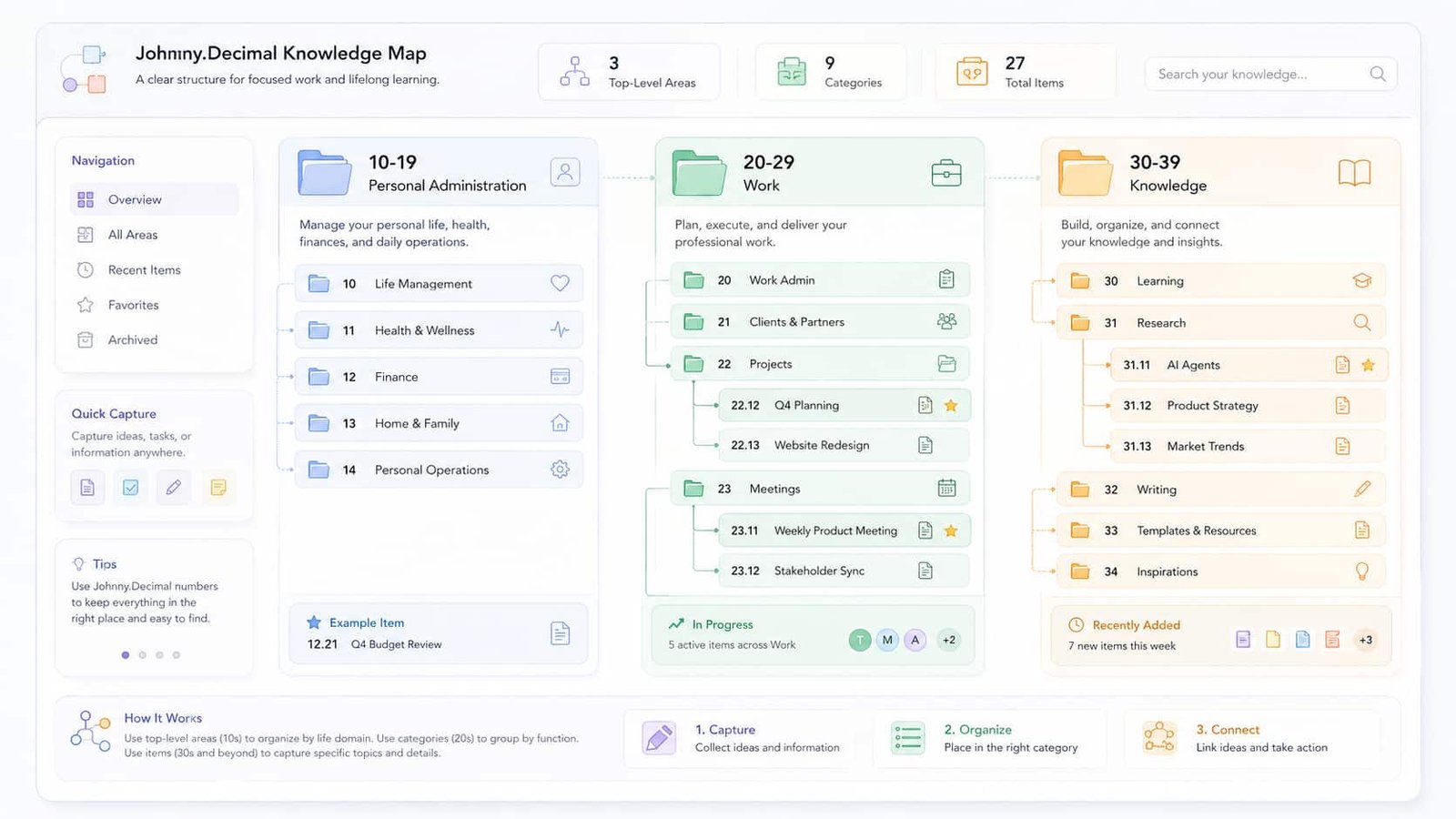
Her first three areas might look like this:
| Area | Example categories |
| 10-19 Personal Administration | 11 Identity & records; 12 Home; 13 Money |
| 20-29 Work | 21 Administration; 22 Projects; 23 Meetings; 24 Career |
| 30-39 Knowledge | 31 Research; 32 Learning; 33 Reference; 34 Writing |
She then creates IDs only when real work needs a stable home.
| Category | Example IDs |
| 22 Projects | 22.11 Website Redesign; 22.12 Q4 Planning; 22.13 Customer Onboarding |
| 23 Meetings | 23.11 Weekly Product Meeting; 23.12 Leadership 1:1s |
| 31 Research | 31.11 AI Agents; 31.12 Search Technology; 31.13 Competitor Research |
| 34 Writing | 34.11 Product Strategy Notes; 34.12 Blog Drafts |
Now imagine Maya receives a new competitor report. She does not start at the root of her drive and ask, ‘Where could this go?’ She thinks: competitor research. That is 31.13. Done.
That reduction in choice is the practical value of Johnny.Decimal. The system does not make information valuable by itself; it reduces the number of places you need to consider when saving or retrieving it.
How to set up Johnny Decimal step by step
The most tempting setup strategy is to spend an entire Saturday designing the perfect system. Resist it. You do not know what your perfect structure looks like until you have used it.
Build enough to start, then let real friction show you what needs to change.
Step 1: Audit what you already have
Before assigning a single number, look at the information you already manage. Check:
- computer folders
- cloud storage
- notes
- active projects
- work documents
- reference material
- personal records
You are looking for repeated themes, not trying to reorganize anything yet. The folder names and collections you have created naturally over the last few years are useful evidence: they show what kinds of information you actually need to manage.
Step 2: Define broad areas
Turn the largest recurring groups into areas. A simple starting point could be:
Avoid turning Meetings, Projects, Reports, and Career into four separate areas. They can usually live comfortably inside one Work area as categories.
Leave unused ranges alone. Empty numbers are not wasted space; they are room for the system to change without forcing a large renumbering project.
Step 3: Create broad categories
Now divide each area into a few useful categories. Inside 30-39 Knowledge, for example, you might use:
Avoid classifying every subject at the category level. Research can contain separate IDs for AI, psychology, marketing, personal knowledge management, or any other topic you actually research.
The decision should become easy: is this research? If yes, you already know the category.
Step 4: Create IDs when you need them
Do not pre-fill dozens of empty IDs because you think you might need them later. Create an ID when a real item needs a stable home.
Your system should grow with your actual work, not with guesses about the work you may do someday.
Step 5: Create your JDex immediately
Start the index as soon as you create IDs. A spreadsheet, note, database, or Brainfo Doc can all work.
Your minimum useful JDex is:
ID | Name | Location or link (optional)
Do not build a 12-column database because somebody else’s system looks impressive on YouTube. Add fields only when they solve a real retrieval or management problem.
Step 6: Move existing information gradually
Start with one active category – for example, 22 Projects. Move your current projects into it and work normally for a few days.
Notice where you hesitate. Maybe every project fits cleanly. Maybe Projects and Clients compete constantly. That hesitation is useful feedback. Fix the structure while it is small; moving 10 folders twice is annoying, but moving 4,000 files twice is much worse.
Step 7: Test before expanding
Use the system in real work and ask four questions:
- Do I usually know which category a new item belongs to?
- Can I find an old item without searching everywhere?
- Are the same two categories constantly competing?
- Am I creating categories faster than useful IDs?
If the filing system makes you think harder about organizing than about the work itself, simplify it. Johnny.Decimal should reduce friction, not create a new hobby called taxonomy maintenance.
Johnny Decimal folder structure: how deep should you go?
One of Johnny.Decimal’s strongest ideas is its resistance to deep folder trees. Every extra level introduces another decision and another place to get lost.
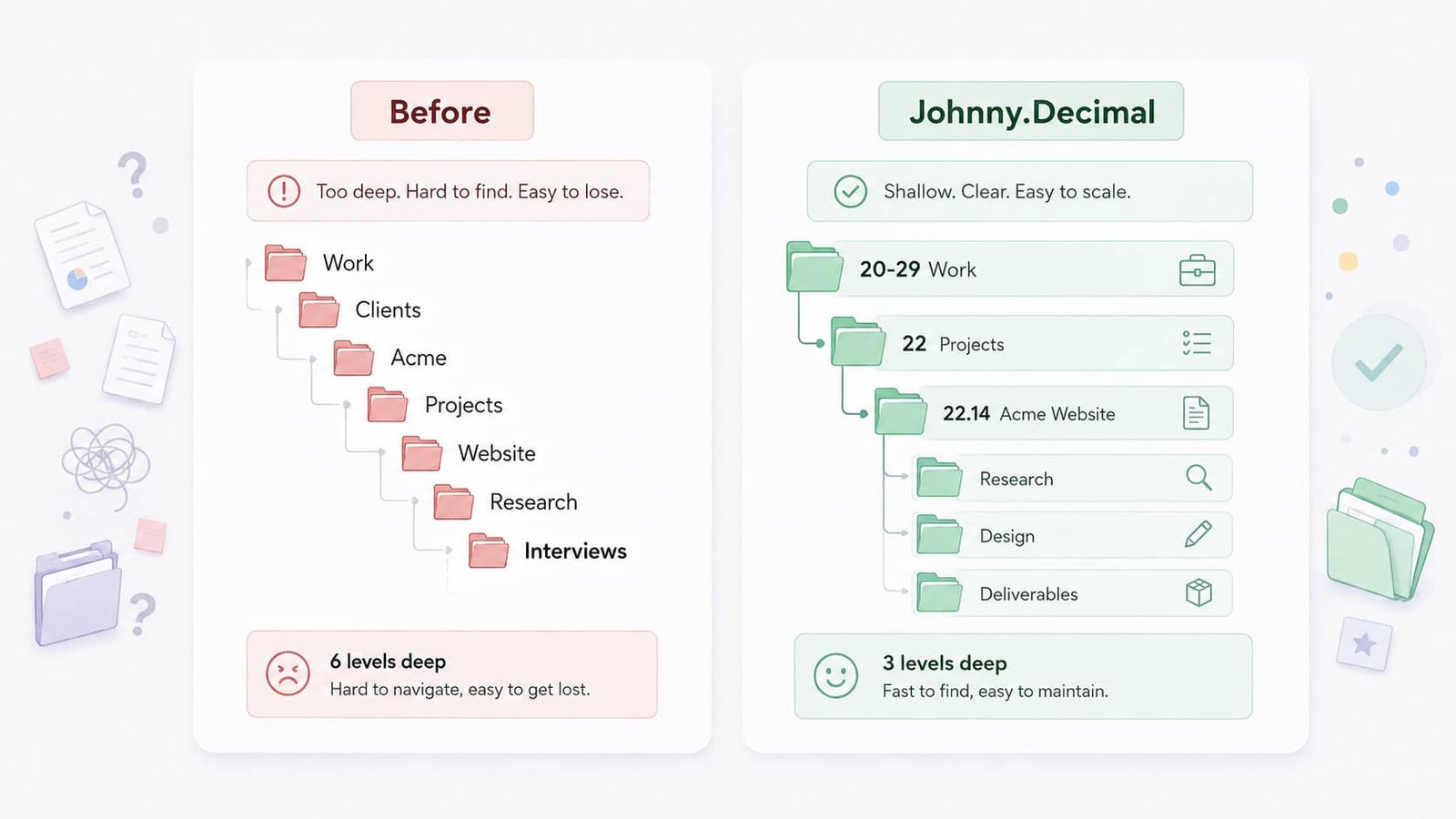
A traditional project path might look like:
Work > Clients > Acme > Projects > Website > Research > Interviews
A Johnny.Decimal version could be:
20-29 Work > 22 Projects > 22.14 Acme Website
You are now at the project’s permanent location after two structural choices. That does not mean an ID can never contain subfolders. A large project may reasonably contain Research, Design, Deliverables, or Archive folders.
The difference is that the project itself already has a stable address. You do not need a philosophical war against subfolders; you need enough structure to find things without rebuilding the maze underneath every ID.
Treat the standard limits as useful pressure. If a real use case needs more depth or capacity, Johnny.Decimal’s official documentation includes expansion options rather than pretending every system must stay identical forever.
Using Johnny Decimal for a second brain
Johnny.Decimal fits well into a second brain when your main problem is simple but painful: where should this information live, and how do I find it again?
That is a narrower job than most second brain frameworks try to solve – and that is useful. Capture, note-taking, task management, idea development, and long-term storage do not all need to be handled by one organizing method.
Johnny.Decimal can simply handle location and reference, while other tools or frameworks handle relationships, workflows, and output.
Johnny Decimal and PARA
PARA organizes information into Projects, Areas, Resources, and Archives. Its structure reflects how information relates to current work and responsibilities. Johnny.Decimal, by contrast, gives locations stable numerical references.
The two can be combined, but they do not need to be. If PARA already makes every document easy to find, adding decimal IDs may create maintenance without solving a real problem. Use Johnny.Decimal when stable addresses improve retrieval or reference.
Johnny Decimal and Zettelkasten
Zettelkasten focuses heavily on relationships between ideas. A note can connect to another note regardless of where either one lives. Johnny.Decimal approaches the problem from the opposite direction: it gives information a home.
For a researcher, a practical combination could be:
- Johnny.Decimal for projects, sources, administrative files, and stable reference collections
- links and backlinks for conceptual relationships between notes
Those jobs do not conflict. They solve different retrieval problems.
Johnny Decimal and CODE
CODE stands for Capture, Organize, Distill, and Express. Johnny.Decimal fits most naturally into the Organize stage. CODE describes what you do with captured information; Johnny.Decimal can give some of that information a stable place to live.
When comparing second brain methods, it is usually more useful to ask which problem each one solves than to search for one framework that wins every category.
How to use Johnny Decimal with Obsidian
Johnny Decimal and Obsidian are a natural pairing because Obsidian gives you both folders and links. You can use Johnny.Decimal for stable location while links and backlinks represent relationships between ideas.
Option 1: Use Johnny Decimal folders
If you naturally browse your vault through folders, the hierarchy can mirror your system:
This makes the physical structure of the vault match the numerical map.
Option 2: Put IDs in note titles or properties
You may not want every note to live inside a dedicated ID folder. In that case, use the ID in a note title or property instead.
Atomic notes can continue using links and backlinks without receiving their own permanent numerical address. This keeps two different concepts separate: Johnny.Decimal handles location; Obsidian handles relationships.
Don’t force every note into the system
A common mistake is to give every tiny thought its own ID. That does not necessarily make knowledge easier to use; it can simply create bookkeeping.
Johnny.Decimal is most convincing for stable collections, projects, subjects, records, and reference points. Use the number where the number helps.
Where else can you use Johnny Decimal?
Johnny.Decimal is not tied to a particular app. The same structure can be used in:
- computer folders
- Google Drive
- Dropbox
- OneDrive
- Obsidian
- Brainfo
- project documentation
- shared team storage
The interesting part comes when you reuse the same ID across tools. If 22.14 Website Redesign is a project, that ID can appear in its file folder, meeting notes, task descriptions, and project documents.
You do not have to force every related object into the same physical location. The ID provides the common reference.
How to use Johnny Decimal with Brainfo
Johnny.Decimal does not require a traditional file explorer. What it needs is a consistent way to identify where information belongs. That makes Brainfo a useful fit because folders, tags, Docs, search, and AI-assisted organization can play different roles instead of forcing the entire method into nested directories.
Use folders as the permanent home for IDs
Suppose you have a project called 22.14 Website Redesign. You can create a Brainfo folder with that exact name and keep the notes, Docs, and bookmarks that belong to the project together.
The number gives the project its Johnny.Decimal address. The descriptive name keeps that address readable, so you never have to memorize a codebook just to understand your own workspace.
Use tags for areas and categories
Folders answer one question: where does this item live? Tags can answer another: what broader context does it belong to?
Content inside 22.14 Website Redesign could also use tags such as:
This is especially useful when an item has one canonical home but still needs to surface in other contexts. A research note can remain in its primary folder while carrying a project-related tag.
Keep your JDex in a Brainfo Doc
Create one Doc called Johnny Decimal Index or JDex and maintain a compact table:
| ID | Name | Type / location |
| 22.11 | Product launch | Project |
| 22.14 | Website redesign | Project |
| 31.11 | AI agents | Research |
| 31.12 | Knowledge management | Research |
For most people, ID + name + location is enough to start. The index becomes more useful as your information spreads across multiple folders, apps, or workspaces.
Search by ID when you can’t remember the location
Numbered IDs are unusually searchable because a string such as 22.14 is more specific than a generic word such as website. If you use the ID consistently in related notes and documents, searching for it can bring the surrounding project context together quickly.
Let AI help with repetitive organization
Once your Johnny.Decimal structure is established, the repetitive part of organization becomes easier to delegate. Brainfo’s Organizer Agent can work with folders and tags, including creating and applying them across workspace content.
For example, after you have decided that 22 Projects is the right category, you can ask the organizer to apply the relevant project folder and tags to related content. You still define the system and its meaning; AI helps with the repetitive classification after the rules are clear.
A simple Brainfo Johnny Decimal setup
A lightweight implementation might use:
- Folders: 22.14 Website Redesign, 22.15 Product Launch, 31.11 AI Agents
- Tags: 20-29 Work, 22 Projects, 30-39 Knowledge, 31 Research
- One searchable JDex Doc that explains what every ID means and, when needed, links to its location
The important point is not to reproduce every Johnny.Decimal component literally. Use Brainfo’s structure to preserve the method’s main benefit: stable, predictable references with as little filing friction as possible.
Johnny Decimal tips that make the system easier to maintain
A clever filing system that nobody maintains is not clever for long. These habits matter more than squeezing every possible convention into your setup.
Leave empty space
Do not try to use every available area or category. You will discover new needs later, and unused ranges give them somewhere to go.
Keep categories broad
If you are frequently stuck between two categories, one of them may be too specific. Money is often easier to manage than separate top-level categories for Banking, Budgeting, Savings, Investments, and Expenses. Use IDs for the detail.
Give numbers stable meanings
The value of 31 grows as you learn that 31 means Research. If you rename and renumber everything every three months, that familiarity never develops.
Keep names beside the numbers
22.14 is compact. 22.14 Website Redesign is useful. The descriptive name keeps the system understandable at a glance.
Keep your JDex current
Create or update the JDex entry at the same time you create the ID. An index that is always one month behind quickly stops being trustworthy.
Don’t number temporary junk
A PDF you will delete tomorrow probably does not need a permanent address. Neither does every screenshot in Downloads. IDs are most valuable for information you expect to keep, revisit, or reference.
Common Johnny Decimal mistakes
Most problems with Johnny.Decimal do not come from misunderstanding what 22.14 means. They come from building too much, too early.
Designing the perfect system before using it
You cannot predict your future information perfectly. A structure that looks elegant on paper may feel awkward during normal work. Start smaller and let real use expose the weak points.
Creating too many categories
Specific categories feel organized during setup. Later, they become filing decisions. Broader categories reduce ambiguity and make the map easier to remember.
Renumbering constantly
Changing an ID occasionally is fine. Constant renumbering destroys one of the method’s main benefits: familiarity.
Duplicating the same item in several places
Some information genuinely fits several contexts. Pick one canonical location, then use links, shortcuts, references, tags, or the JDex to point to it elsewhere.
Recreating a deep folder tree under every ID
If every ID contains another six levels of nested folders, the decimal number has not solved much. Use subfolders when the contents genuinely require them, and keep their structure predictable.
Johnny Decimal pros and cons
| Strengths | Trade-offs |
| Gives information predictable locations | Requires some planning at the start |
| Creates short, stable references | Numbering can feel unfamiliar initially |
| Limits endless folder nesting | Some items can plausibly fit more than one category |
| Works across several apps and storage locations | The system can be overengineered |
| Makes larger collections easier to map | Very small collections may not need it |
| A JDex can index information across tools | The index needs basic maintenance |
Johnny.Decimal becomes most valuable when your information volume is high enough that ‘I’ll just search for it’ has stopped feeling like a reliable retrieval strategy.
Who should use Johnny Decimal?
Johnny.Decimal is worth considering if you:
- manage a large number of files or documents
- regularly forget where information is stored
- work across several storage locations
- manage many recurring or long-running projects
- prefer visible structure and stable folders
- want short references for important collections
- have a folder tree that keeps getting deeper
Knowledge workers are particularly good candidates because work information accumulates quietly: meeting notes, projects, research, reports, reference files, and career documents. At some point, a stable map starts to matter.
Who probably doesn’t need it?
You may not get much value from Johnny.Decimal if your collection is small and already easy to navigate, or if search solves almost every retrieval problem you have.
The same applies if your work revolves around highly connected atomic notes. Forcing every thought into a rigid numbered location can create maintenance without improving retrieval. A method is useful only when its constraints solve a problem you actually have.
Is Johnny Decimal worth using?
Johnny.Decimal is worth trying when folder names alone are no longer giving you a reliable map of your digital information.
Its strength comes from a small sequence of constraints: choose an area, choose a category, create an ID, record it in the JDex. After enough use, numbers such as 22 and 31 stop looking arbitrary and start feeling like familiar places.
You do not need to reorganize your entire digital life to find out whether that works for you. Pick one messy part of your workspace, create one area, add a few broad categories, and give a handful of important items IDs. Use the system for a week before expanding it.
If retrieval becomes easier, grow from there. If the numbers create more friction than they remove, simplify the setup rather than forcing the method.
And if you want to test Johnny.Decimal inside a broader second-brain workspace, Brainfo gives you folders, tags, Docs, search, and AI-assisted organization in one place. Start with a single area, build a small JDex, and let the structure earn its way into the rest of your system.
Frequently asked questions
What is the Johnny Decimal system?
Johnny.Decimal is a system for organizing information into numbered areas, categories, and IDs. Each ID gives a specific collection of information a stable reference such as 22.14.
How does Johnny Decimal numbering work?
A number such as 22.14 has two parts. 22 identifies the category, which belongs to an area such as 20-29 Work. .14 identifies the specific item inside that category.
How many categories can you have in Johnny Decimal?
A standard Johnny.Decimal system can contain up to 10 areas, with up to 10 categories in each area and up to 100 IDs in each category. The official documentation also describes expansion options for systems that need more capacity or depth.
What is a JDex?
A JDex is the master index of a Johnny.Decimal system. It records what each ID means and can also store the item’s location or link when your information is spread across several tools.
Can you use Johnny Decimal with Obsidian?
Yes. You can use Johnny.Decimal folders, note titles, or properties for stable location while keeping Obsidian links and backlinks for relationships between notes.
Is Johnny Decimal better than PARA?
Neither is universally better. Johnny.Decimal focuses on stable numbered locations and references, while PARA organizes information around Projects, Areas, Resources, and Archives. Choose the method that solves the retrieval problem you actually have – or combine them only when the combination remains simple.





